Databricks Tips #15: Query Federation — querying Postgres and MySQL without moving data
Databricks Tips
Data Architecture
How to query Postgres and MySQL from Databricks without moving data: connections and foreign catalogs in Unity Catalog, which part of the query gets pushed down to the source database and how to verify it with EXPLAIN FORMATTED, plus the criteria for federating, ingesting, or materializing.
You get asked to join the lakehouse sales data with the customers table that lives in a transactional Postgres nobody is ever going to migrate. Today that gets solved in one of two ways, both bad: a nightly dump that always arrives stale, or a spark.read.jdbc with the credentials pasted into the notebook, invisible to governance and to the colleague who inherits the pipeline.
Lakehouse Federation is the third option: that Postgres (or MySQL, Oracle, SQL Server, Redshift, Snowflake, BigQuery) shows up in Unity Catalog as just another catalog. You query it with regular SQL, apply the same GRANTs as any other table, and don’t move a single byte. In this post we cover how to set it up in three commands, what happens under the hood when you run a query, which part of the work gets pushed down to the source database, and the criteria for deciding when to federate and when not to.
NoteTL;DR
- Lakehouse Federation mirrors an external database as a foreign catalog in Unity Catalog: you query it like any table, with fine-grained per-table permissions, always read-only.
- The setup is three commands:
CREATE CONNECTION(credentials viasecret(), as the docs recommend),CREATE FOREIGN CATALOG, and the usualGRANTs. - The engine pushes filters, projections and aggregates down to the source database (pushdown) and processes the rest on its side.
EXPLAIN FORMATTEDeven shows the literal SQL that travels to the database (theExternal engine queryline). - There is no caching: every query hits the source database, and the result comes back through a single stream to a single executor. With large result sets that means OOM risk (out of memory).
- Federation works well for exploration and ad hoc queries. For recurring volume you’re better off ingesting with Lakeflow Connect, and the middle ground is materialized views on top of federated tables.
1. The problem: the data you need lives in another database
Almost every company has an operational system (the ERP, the core system, the homegrown CRM) sitting on a Postgres or MySQL that works fine, has an owner, and is on nobody’s migration roadmap. But the analyses you’re asked for need that data today.
The classic solutions have aged badly:
- The scheduled dump: a job copies the tables every night into the bronze zone. It works, but it duplicates storage, arrives hours late, and every new table means a pipeline change. For data you query twice a month, that’s paying a toll every single day.
- Direct
spark.read.jdbc: the classic notebook withhost,userandpasswordhardcoded. No governance, no control over who accesses what, credentials scattered across the workspace, and every consumer reinvents the connection.
Lakehouse Federation fills exactly that gap: live, governed, declarative access to databases you’re not going to move.
2. What Lakehouse Federation is (and why it’s two different things)
The name “Lakehouse Federation” groups two distinct mechanisms, and it pays not to mix them up:
- Query federation is the one that applies to Postgres and MySQL: your query (or its pushable part) travels to the source database over JDBC (Java Database Connectivity, the standard protocol applications use to talk to databases) and runs there. The work is split between the source database and your warehouse.
- Catalog federation sends no queries to any external engine: it reads the table’s files straight from object storage using Databricks compute. It’s designed for incremental migrations from a legacy Hive Metastore (HMS, the catalog of the pre Unity Catalog era), AWS Glue, or Snowflake.
Everything that follows in this post is query federation. The available connectors: MySQL, PostgreSQL, Oracle, SQL Server, Teradata, Amazon Redshift, Azure Synapse, Snowflake, Google BigQuery, Salesforce Data 360, and even another Databricks workspace.
TipThe flip side of OpenSharing
Federation brings data in from outside without copying it; Delta Sharing and the open formats share it outward without copying it. It’s the same idea in both directions: the data stays where it lives, and what travels is the query, not the file.
3. Setup in three commands
The setup creates two Unity Catalog securable objects: a connection (host, port and credentials) and a foreign catalog that mirrors the external database. From there on, the usual GRANTs govern, the same ones you already use for the rest of your catalog.
-- 1. The connection: host + credentials. Databricks recommends
--    passing credentials with secret(), not as plain text.
CREATE CONNECTION pg_operacional TYPE postgresql
OPTIONS (
  host 'ep-cool-water-123456.us-east-2.aws.neon.tech',
  port '5432',
  user secret('lab-federation', 'pg-user'),
  password secret('lab-federation', 'pg-password')
);

-- 2. The foreign catalog: mirrors ONE database from the server.
CREATE FOREIGN CATALOG pg_ventas
USING CONNECTION pg_operacional
OPTIONS (database 'neondb');

-- 3. Fine-grained permissions, like in any UC catalog.
GRANT USE CATALOG, USE SCHEMA, SELECT
ON CATALOG pg_ventas TO `data-analysts`;
Done: SELECT * FROM pg_ventas.public.orders LIMIT 10 and you’re reading the Postgres live.
ImportantThe Postgres vs MySQL trap
In Postgres, the foreign catalog mirrors one database (the database option in step 2 is required); if you need another database from the same server, that’s another catalog on the same connection. In MySQL that option isn’t needed and the documented syntax doesn’t even include it, because MySQL uses a two-layer namespace: in practice, the server’s databases end up exposed as schemas of the catalog. The only documented catalog option for MySQL is tinyInt1isBit (how to interpret tinyint(1) columns), and on top of that SSL is mandatory (Secure Sockets Layer, the encrypted connection) to create the connection.
WarningNames get flattened to lowercase
Unity Catalog lowercases schema and table names when mirroring them. Two silent consequences: if the source database has both Orders and orders, there’s no guarantee which one survives; and names that are invalid for UC are simply ignored with no warning when the catalog is created. If a table “doesn’t show up”, start here.
4. How it works under the hood
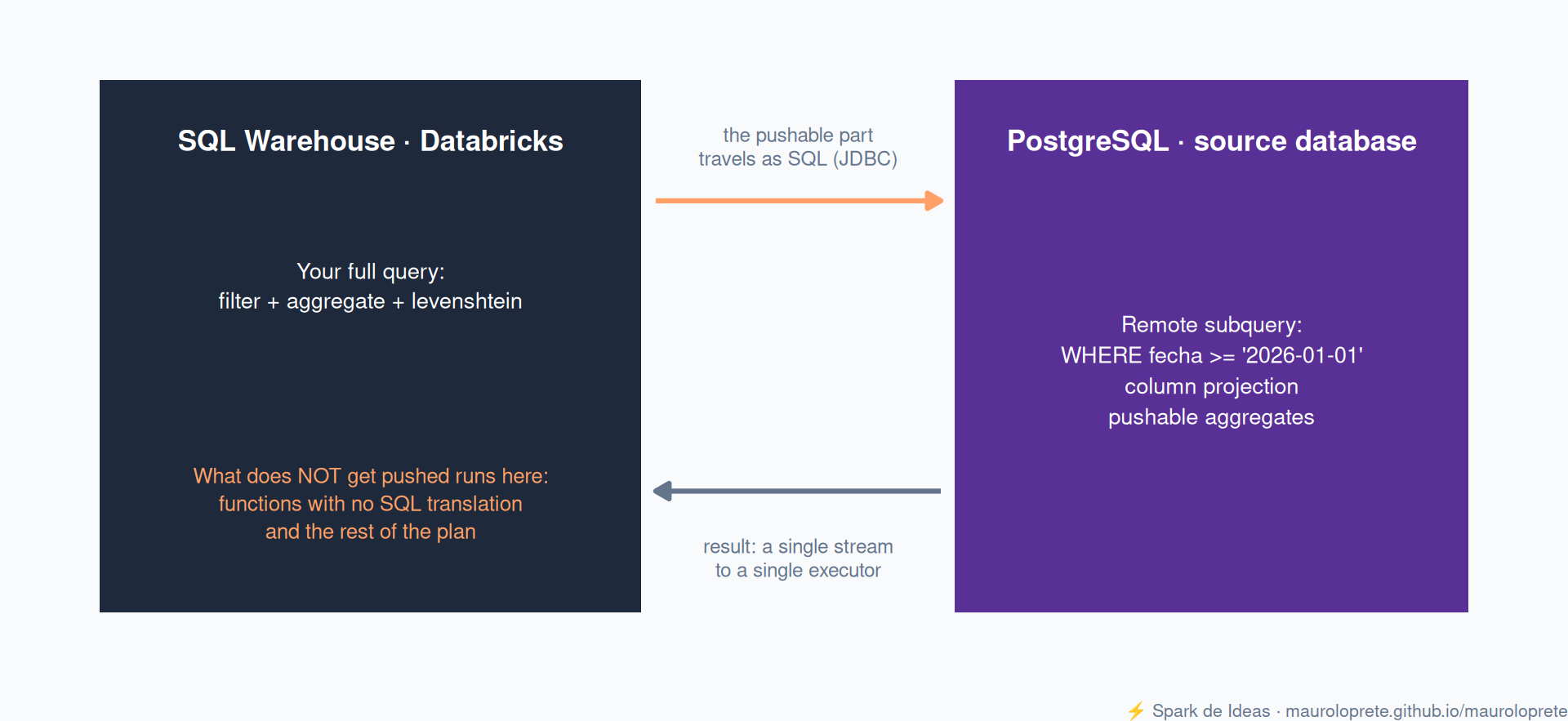
When you run a query that touches a foreign table, Databricks doesn’t “copy the table and then filter”: it builds a remote subquery for each foreign table in the plan, sends it over JDBC, and the source database resolves it. Whatever the database returns comes back to the warehouse for the rest of the plan.
Three practical consequences of this design:
- The result comes back through a single stream to a single executor. If the remote subquery returns millions of rows, that executor can run out of memory. Scaling up the cluster doesn’t help: the bottleneck is the stream, not the compute.
- There is no caching. Neither the Result Cache nor the Disk Cache applies to federated queries: every execution hits the source database. The dashboard that refreshes every 5 minutes hits your transactional Postgres every 5 minutes.
- Performance is set by the source database, not the warehouse. Photon accelerates whatever runs on your side of the JDBC: in the lab in section 6, the local stages of the plan show up as
PhotonFilterandPhotonProject. But no cluster can speed up how long the database takes to resolve the remote subquery.
5. Pushdown: what travels to the database and what stays
Pushdown is what makes this usable: instead of pulling the table and filtering here, the engine translates everything it can into the source database’s SQL and pushes it there. For Postgres and MySQL, on any compute, the following get pushed:
- Filters (
WHERE) and projections (reading only the columns you ask for) - Aggregates (
GROUP BY,count,sum, …) LIMITandOFFSET, plus sorting when it goes with a limit- Boolean and arithmetic operators (arithmetic ones require ANSI mode enabled)
- Functions for strings, dates and math, with partial support and only inside filter expressions
And what doesn’t? Whatever the engine can’t translate into the database’s SQL. Still, be careful about taking the docs’ lists at face value: pushdown improves with every warehouse channel, and the list that counts is the one your query’s plan shows you. It happened to me in the lab in section 6, with an example lifted straight from the docs.
An example that today does stay on the Databricks side: levenshtein(), the edit distance between two strings (how many letters you have to change to turn one into the other). Spark ships it built-in, but Postgres only has it via an extension, so there’s no possible translation.
TipThe AND trick
Pushdown is not all-or-nothing: in a compound filter with AND, the pushable part travels even if the other doesn’t. In the lab, WHERE fecha >= '2026-01-01' AND levenshtein(cliente, 'cliente_42') <= 1 produces a remote subquery carrying the date filter (the database returns only those rows) and a local PhotonFilter that keeps the levenshtein. Arranging your filters so the selective part is pushable changes how much data crosses the wire.
6. The lab: two queries against a Postgres
The experiment is simple: a 5-million-row table in a Postgres, one query that gets pushed down entirely, one that doesn’t, and each one’s plan to see the difference. The Postgres comes from Neon, which gives you a serverless one with a public endpoint, no credit card asked. Everything is at spark-de-ideas-labs/tips/query-federation: the step-by-step to create the database via UI or CLI, the SQL, and the reference outputs.
Step 1: the database. Create a project on Neon and, in its SQL editor, generate an orders table with synthetic data:
CREATE TABLE orders AS
SELECT
  g AS order_id,
  'cliente_' || (g % 1000) AS cliente,
  (ARRAY['web','app','tienda'])[1 + g % 3] AS canal,
  DATE '2025-01-01' + (g % 540) AS fecha,
  round((random() * 900 + 100)::numeric, 2) AS monto
FROM generate_series(1, 5000000) AS g;
Step 2: secrets and connection. Store the Neon credentials in a secret scope and create the connection and the catalog with the DDL from section 3 (Neon requires SSL, same as MySQL).
databricks secrets create-scope lab-federation
databricks secrets put-secret lab-federation pg-user
databricks secrets put-secret lab-federation pg-password
Step 3: the two queries. One with a pushable filter and aggregate, and one with levenshtein, which has no translation:
-- A: the date filter and the aggregate get pushed down
EXPLAIN FORMATTED
SELECT canal, count(*) AS ordenes
FROM pg_ventas.public.orders
WHERE fecha >= '2026-01-01'
GROUP BY canal;

-- B: levenshtein has no translation; the filter runs on this side
EXPLAIN FORMATTED
SELECT *
FROM pg_ventas.public.orders
WHERE levenshtein(cliente, 'cliente_42') <= 1;
The plan for query A, run against the lab’s Neon on a serverless warehouse, exactly as EXPLAIN FORMATTED returns it:
== Physical Plan ==
PhotonResultStage (5)
+- PhotonColumnarToRow (4)
   +- PhotonProject (3)
      +- PhotonRowToColumnar (2)
         +- * Scan JDBC v1 Relation from v2 scan pg_ventas.public.orders (1)


(1) Scan JDBC v1 Relation from v2 scan pg_ventas.public.orders [codegen id : 1]
Output [2]: [canal#13500, count#13501L]
Arguments: [canal#13500, count#13501L], [StructField(canal,StringType,true), StructField(count,LongType,true)], PushedDownOperators(Some(org.apache.spark.sql.connector.expressions.aggregate.Aggregation@248ae007),None,None,None,List(),ArraySeq(fecha IS NOT NULL, fecha >= 20454),List(),Some(pg_ventas.public.orders)), JDBCRDD[706] at $anonfun$withExecutionPhase$1 at AttributionContext.scala:349, JDBC v1 Relation from v2 scan, `pg_ventas`.`public`.`orders`, Statistics(sizeInBytes=8.0 EiB, ColumnStat: N/A)
External engine query: SELECT "canal",COUNT(*) FROM "public"."orders"  WHERE ("fecha" IS NOT NULL) AND ("fecha" >= '2026-01-01') GROUP BY "canal"

(2) PhotonRowToColumnar
Input [2]: [canal#13500, count#13501L]

(3) PhotonProject
Input [2]: [canal#13500, count#13501L]
Arguments: [canal#13500, count#13501L AS ordenes#13477L]

(4) PhotonColumnarToRow
Input [2]: [canal#13500, ordenes#13477L]

(5) PhotonResultStage
Input [2]: [canal#13500, ordenes#13477L]


== Photon Explanation ==
The query is fully supported by Photon.
The line worth the whole post is External engine query: the literal SQL that travels to Postgres. The scan node tells the same story in PushedDownOperators: there go the pushed aggregate and filters, with the date converted to 20454 (days since 1970-01-01). Filter and aggregate went over entirely: Postgres aggregated 1.6 million rows on its side and three rows crossed the wire:
tienda | 546281
app    | 537022
web    | 537022
In query B the plan changes shape: a local PhotonFilter appears carrying the levenshtein, and the remote subquery travels almost bare, with the WHERE reduced to the only translatable bit:
== Physical Plan ==
PhotonResultStage (5)
+- PhotonColumnarToRow (4)
   +- PhotonFilter (3)
      +- PhotonRowToColumnar (2)
         +- * Scan JDBC v1 Relation from v2 scan pg_ventas.public.orders (1)


(1) Scan JDBC v1 Relation from v2 scan pg_ventas.public.orders [codegen id : 1]
Output [5]: [order_id#13513, cliente#13514, canal#13515, fecha#13516, monto#13517]
Arguments: [order_id#13513, cliente#13514, canal#13515, fecha#13516, monto#13517], [StructField(order_id,IntegerType,true), StructField(cliente,StringType,true), StructField(canal,StringType,true), StructField(fecha,DateType,true), StructField(monto,DecimalType(38,18),true)], PushedDownOperators(None,None,None,None,List(),ArraySeq(cliente IS NOT NULL),List(),Some(pg_ventas.public.orders)), JDBCRDD[707] at $anonfun$withExecutionPhase$1 at AttributionContext.scala:349, JDBC v1 Relation from v2 scan, `pg_ventas`.`public`.`orders`, Statistics(sizeInBytes=8.0 EiB, ColumnStat: N/A)
External engine query: SELECT "order_id","cliente","canal","fecha","monto" FROM "public"."orders"  WHERE ("cliente" IS NOT NULL)

(2) PhotonRowToColumnar
Input [5]: [order_id#13513, cliente#13514, canal#13515, fecha#13516, monto#13517]

(3) PhotonFilter
Input [5]: [order_id#13513, cliente#13514, canal#13515, fecha#13516, monto#13517]
Arguments: (levenshtein(cliente#13514, cliente_42, None) <= 1)

(4) PhotonColumnarToRow
Input [5]: [order_id#13513, cliente#13514, canal#13515, fecha#13516, monto#13517]

(5) PhotonResultStage
Input [5]: [order_id#13513, cliente#13514, canal#13515, fecha#13516, monto#13517]


== Photon Explanation ==
The query is fully supported by Photon.
Here Postgres returns the entire table (5 million rows through the single stream from section 4) and the warehouse filters afterwards. Same table, same catalog, and one query costs three rows of traffic while the other costs five million. The same information is in the UI’s Query Profile, on the scan node: it’s the first place to look when a federated query “feels slow”.
NoteThe docs say one thing; the plan shows another
This lab originally had query B written with ILIKE (the case-insensitive LIKE), which is the docs’ own example of a non-pushable filter. On running it, the engine rewrote it as LOWER("cliente") LIKE '%tech%' and pushed it anyway. Verify against your plan, not against the docs.
7. The tuning knobs
Three knobs, from the one that gives the most to the one that asks the most:
fetchSize: how many rows each JDBC round trip brings back. By default, most JDBC connectors fetch the result all at once (atomic fetch), exactly the OOM scenario from section 4; setting afetchSizesplits it into batches, and the docs recommend a large one (for example100000). It’s set per query:SELECT ... FROM pg_ventas.public.orders WITH ('fetchSize' 100000). Requires DBR 16.1+ (Databricks Runtime, the engine version on clusters) or a warehouse on channel 2024.50+.- Parallel reads: with
numPartitions,partitionColumn,lowerBoundandupperBoundthe remote scan splits into several concurrent subqueries, each with its own range. Requires DBR 17.1+ or channel 2025.25+, and beware: it doesn’t work through views that reference federated tables. - Join pushdown: pushing the entire join so the source database resolves it. For Postgres and MySQL it’s in Public Preview (for Redshift, Snowflake and BigQuery it’s already GA, Generally Available, stable and supported): it requires DBR 17.2+ or channel 2025.30+, enabling the Join Pushdown for Federated Queries preview in the workspace, and it only covers inner, left outer and right outer joins.
WarningDon’t mix up the requirements
Federation itself works from DBR 13.3 LTS or warehouse channel 2023.40+. The 17.x/2025.x requirements above belong only to each tuning knob. If you read “requires 17.2” in the docs, that’s the join pushdown, not federating.
8. Requirements and permissions
The minimum for this to work:
- Workspace with Unity Catalog enabled
- Compute: DBR 13.3 LTS+ (Standard or Dedicated access mode) or a Pro or Serverless SQL warehouse on channel 2023.40+ (warehouse types refresher in Tips #9)
- Network connectivity from the compute to the source database (with serverless and private databases this is a chapter of its own: allowlists, stable IPs, Private Link)
- Permissions:
CREATE CONNECTIONon the metastore for the connection;CREATE CATALOGplus ownership of the connection (orCREATE FOREIGN CATALOGon it) for the catalog
9. Gotchas
- For databases it’s read-only, no exceptions. The only write path in all of Lakehouse Federation exists in catalog federation over the workspace’s internal Hive metastore. If you need to write to the remote Postgres, this isn’t the tool: the docs point you to the Spark Data Source API with classic JDBC.
- No caching of any kind. Every query, including the one your dashboard repeats, executes on the source database. Be kind to your Postgres: point at a read replica if one exists.
- The single stream can take down an executor with OOM.
SELECT *on a large federated table is the exact recipe. Always filter and project; that’s what pushdown is for. - Lowercasing and silent discards. Names go lowercase, collisions have no guaranteed winner, invalid names are ignored with no warning (section 3).
- Concurrency is capped by the warehouse, not the connection. Throttling is determined by the Databricks SQL concurrent query limit: you queue up by saturating the warehouse, not by many users pointing at the same foreign catalog. Across different warehouses there’s no per-connection limit.
- Metadata refreshes itself on every query, with one caveat. Unity Catalog fetches the latest metadata at query time: new tables and schema changes are picked up without doing anything.
REFRESH FOREIGN CATALOG pg_ventasis left for external engines that read the catalog without going through Databricks Runtime (those accesses don’t trigger the refresh) or for proactively warming the cached metadata for performance. - MySQL has its own rules. SSL mandatory, the
databaseoption doesn’t apply to the catalog, andtinyint(1)interpreted as boolean unless you configuretinyInt1isBit.
10. When to federate and when not to
The real question isn’t “can I federate?” but “how many times a day am I going to pay the toll of reading live?”. The decision table:
| Situation | Best option |
|---|---|
| Exploration, PoC (proof of concept), ad hoc query | Federate: zero infrastructure, fresh data |
| The same data queried many times a day | Ingest with Lakeflow Connect: you pay for the copy once, not per query |
| Heavy, recurring query on federated tables | Materialized view on the federated table: the middle ground, precomputed result with a scheduled refresh |
| You need to write to the source database | Spark Data Source API (JDBC): Federation is read-only |
| You’re creating a new Postgres inside the ecosystem | Lakebase: the managed Postgres from Databricks, no JDBC in between |
| Sharing data outside your organization | Delta Sharing (Tips #13) |
TipThe rule of thumb
Federate what you query rarely and changes a lot; ingest what you query a lot and changes rarely. And when “rarely” turns into “a lot”, the materialized view buys you time before building the ingestion.
References
More from this series
If this post helped, check out the previous Databricks Tips:
- Tips #1: Databricks Asset Bundles — IaC for Databricks
- Tips #2: Delta Lake — the 7 things you wish you’d known
- Tips #3: Unity Catalog — governance nobody implements well
- Tips #4: Structured Streaming — watermarks, triggers and micro-batch
- Tips #5: MLflow + Unity Catalog — from experiment to model
- Tips #6: Feature Engineering — features that survive production
- Tips #7: Docker on Databricks — custom containers
- Tips #8: Jobs & Workflows — streaming and event-driven triggers
- Tips #9: SQL Warehouses — the compute that turns itself on
- Tips #10: AI Gateway — centralized governance for LLMs
- Tips #11: Lakeflow Declarative Pipelines — declarative pipelines with built-in quality
- Tips #12: Photon — the C++ engine that speeds up your queries
- Tips #13: OpenSharing — sharing without copying
- Tips #14: Liquid Clustering — the replacement for partitions and Z-ORDER
Next in the series: R + Databricks with sparklyr, or how to query all of this (foreign catalogs included) without leaving R.