Databricks Tips #9: SQL Warehouses — the compute that turns itself on
Databricks Tips
Data Engineering
Serverless
Classic, Pro or Serverless: which one to pick, how to size it, and the gotchas that will save you money. With Photon, Query Federation, AI Functions and real costs.
Your team runs SQL queries against the lakehouse. Dashboards, reports, exploratory analysis, some light ETL. And it probably does so with an All-Purpose cluster running all day long.
There’s a better way.
NoteTL;DR
- Serverless starts in seconds, shuts itself down, and the real cost is usually lower than Classic (pricier DBU but no separate VMs).
- Photon (vectorized C++) is enabled by default — up to 12x speedup without changing any code.
- Query Federation lets you query PostgreSQL, Snowflake and BigQuery without migrating data.
- AI Functions apply LLMs from pure SQL (
ai_classify,ai_extract,ai_summarize). - If you see spill to disk in the Query Profile, your warehouse is too small. If you see queued queries, you need more capacity.
0. SQL Warehouses in 2 minutes
A SQL Warehouse is not a general-purpose cluster. It’s a specialized SQL endpoint that:
- Runs SQL exclusively (no Python, no R, no interactive Scala)
- Uses Photon by default — a vectorized C++ engine that replaces JVM execution
- Has concurrency scaling — scales automatically when multiple queries run at once
- Turns itself on when a query arrives and shuts itself down when there’s no activity
- Integrates with Unity Catalog for governance
When to use it:
- BI and dashboards (Power BI, Tableau, Looker)
- Light SQL ETL (
INSERT INTO ... SELECT,MERGE,CTAS) - Ad-hoc analytics (SQL explorations from the editor)
- AI Functions (LLMs from SQL)
- Query Federation (queries against external sources)
When NOT to:
- Continuous streaming (Structured Streaming with
ProcessingTime) - ML training (Spark ML, MLlib, scikit-learn, PyTorch)
- Heavy Python/R notebooks
- Complex ETL with vectorized UDFs or pandas UDFs
1. The 3 types: Classic vs Pro vs Serverless
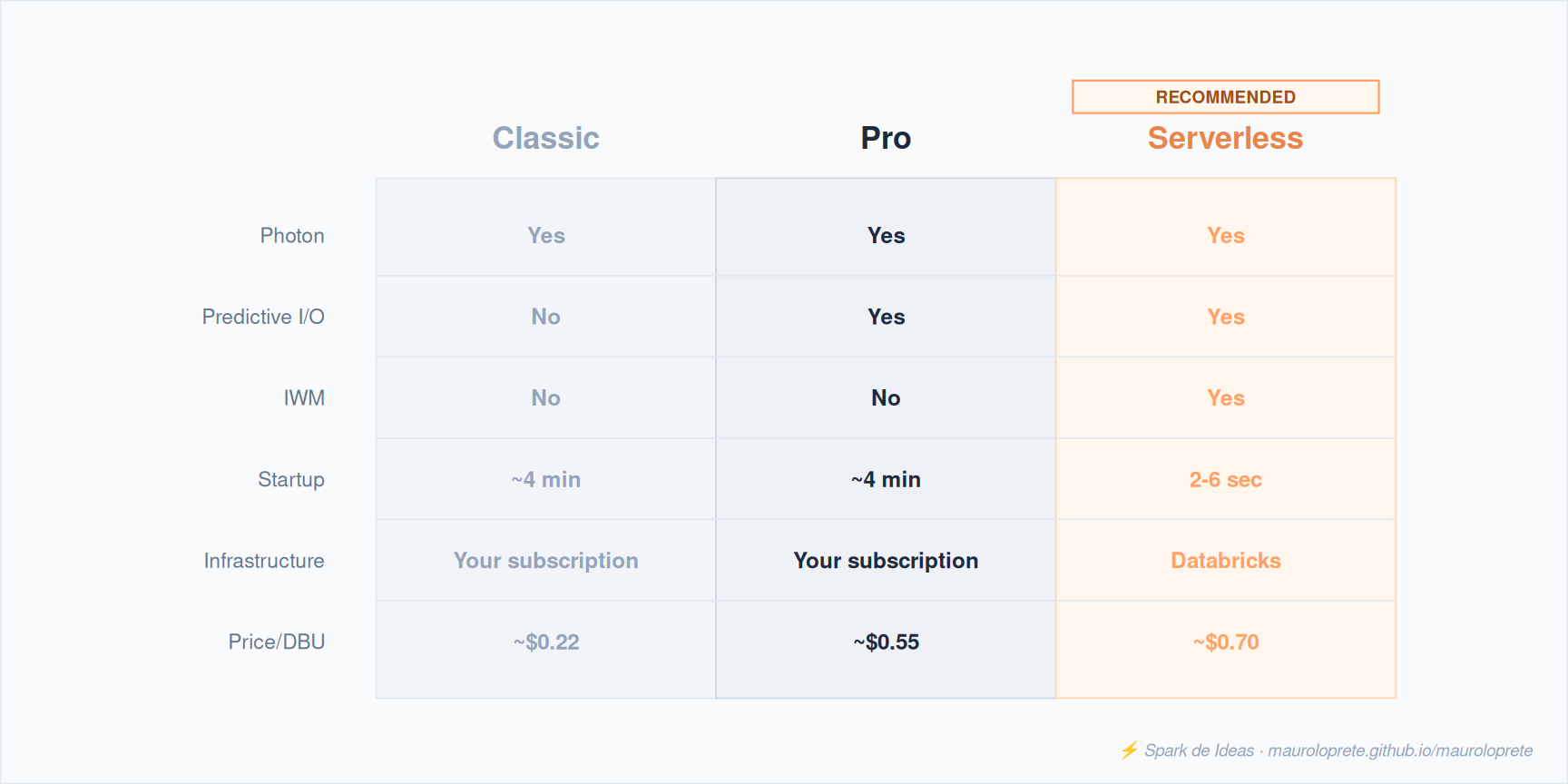
The full table:
| Feature | Classic | Pro | Serverless |
|---|---|---|---|
| Photon | Yes | Yes | Yes |
| Predictive I/O | No | Yes | Yes |
| Intelligent Workload Management | No | No | Yes |
| Startup time | ~4 min | ~4 min | 2-6 sec |
| Infrastructure | Your Azure subscription | Your Azure subscription | Managed by Databricks |
| Spot instances | Yes (configurable) | Yes (configurable) | Not applicable |
| Query Federation | No | Yes | Yes |
| AI Functions | No | Yes | Yes |
| DBU price (Azure, ref.) | ~$0.22 | ~$0.55 | ~$0.70 |
ImportantThe price is not what it seems
Serverless is more expensive per DBU ($0.70 vs $0.22 Classic), but the DBU price includes the infrastructure. With Classic/Pro you pay DBUs + Azure VMs separately. For intermittent workloads, Serverless TCO is usually lower.
When to use each one:
- Serverless (default): most workloads. Instant startup, smart scaling, no infra management.
- Pro: when you need VNet injection, an on-premises connection, or Serverless isn’t available in your region.
- Classic: only if you have a legacy external Hive metastore that you haven’t migrated to Unity Catalog.
2. Serverless: why it changes the rules
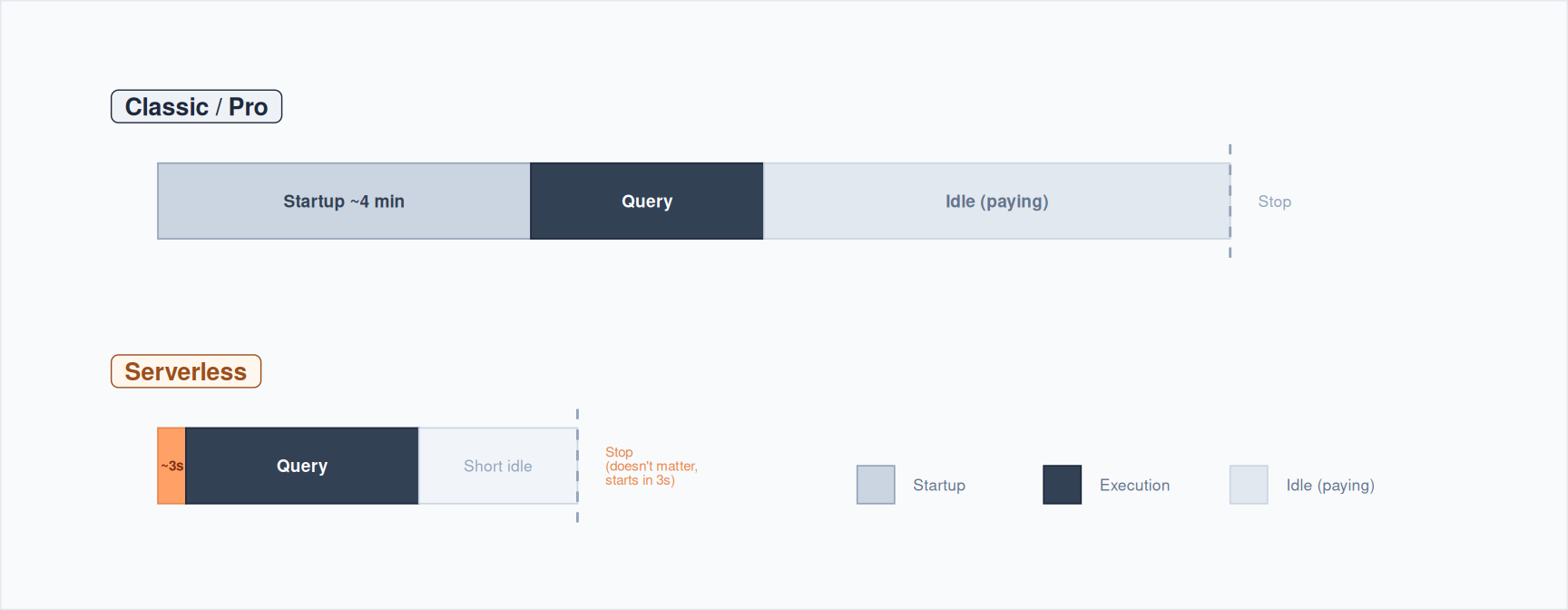
The difference between Classic/Pro and Serverless isn’t just the price. It’s a different operating model.
Classic/Pro:
- A query arrives → the warehouse was off → 4 minutes of startup
- The query runs
- The warehouse sits idle → waiting for more queries → paying for doing nothing
- After 10+ minutes of no activity → it shuts down
Serverless:
- A query arrives → 2-6 seconds of startup
- The query runs
- No queries → shuts down in 5 minutes (and it doesn’t matter, because it starts up in seconds)
Intelligent Workload Management (IWM)
IWM is exclusive to Serverless. It uses internal ML models to:
- Predict the resources each query needs before running it
- Route the query to the cluster with available capacity
- Scale in seconds if the queue grows (not minutes like Classic/Pro)
- Shrink clusters automatically when demand drops
With Classic/Pro, scaling follows fixed rules (static thresholds). With Serverless, it’s adaptive.
TipAggressive auto-stop on Serverless
Set auto-stop to 5 minutes without fear. Since it starts in 2-6 seconds, users won’t even notice. With Classic/Pro, a low auto-stop is unacceptable because the 4-minute cold start ruins the experience.
3. Photon: the engine that makes the difference
Photon is the vectorized execution engine that Databricks built from scratch in C++. It’s enabled by default on all SQL Warehouses.
What it does:
- Improved query optimizer — enhances Catalyst’s execution plan
- Cache layer between execution and object storage — up to 5x faster scans
- Native vectorized execution in C++ — processes data in columnar batches, not row by row
Reported performance:
- Up to 12x speedup vs other cloud data warehouses
- Up to 80% TCO savings
- Compatible with Spark SQL and the DataFrame API — no code changes needed
NotePhoton on regular clusters
Photon is also available on All-Purpose and Job Clusters, but you have to enable it explicitly. On SQL Warehouses it’s on by default.
4. Sizing and concurrency scaling
T-shirt sizes
SQL Warehouses are configured by size, not by node count. Each size determines the number of workers:
| Size | Workers | Typical use case |
|---|---|---|
| 2X-Small | 1 | Development, simple queries |
| X-Small | 2 | Small teams, light BI |
| Small | 4 | Standard production |
| Medium | 8 | Production with medium concurrency |
| Large | 16 | Production with high concurrency |
| X-Large | 32 | Heavy queries over large tables |
| 2X-Large | 64 | Enterprise, high concurrency + large tables |
| 3X-Large | 128 | Heavy enterprise |
| 4X-Large | 256 | Extreme workloads |
TipPractical sizing rule
Start with a warehouse larger than you think you need and scale down later. It’s easier to diagnose a warehouse with room to spare than one that falls short. Monitor spill to disk in the Query Profile as a signal of under-sizing.
Concurrency scaling (Classic/Pro)
Classic and Pro scale with fixed-threshold rules:
- 1 cluster for every 10 concurrent queries (fixed ratio)
- The upscaling logic is based on estimated load:
< 2 min of load: no scaling
2-6 min: +1 cluster
6-12 min: +2 clusters
12 min: +3 clusters and +1 extra every 15 min
- If a query waits 5 minutes in the queue, upscaling is forced
- Downscaling: if load stays low for 15 consecutive minutes, it shrinks
- Maximum queued queries: 1,000
Concurrency scaling (Serverless)
Serverless doesn’t use fixed rules. IWM predicts and provisions dynamically:
- Scales in seconds (not minutes)
- No fixed queries-per-cluster ratio
- The autoscaler anticipates demand instead of reacting after the fact
5. Query Federation
Query Federation (or Lakehouse Federation) lets you run queries against external sources without migrating the data to Databricks.
Supported sources
- PostgreSQL, MySQL, SQL Server
- Oracle, Teradata
- Azure Synapse (SQL DW)
- Amazon Redshift
- Snowflake
- Google BigQuery
- Salesforce Data 360
- Other Databricks workspaces
Setup
- Create a connection in Unity Catalog (credentials for the external source)
- Create a foreign catalog that maps the remote catalog
- Query external tables as if they were local:
-- After setting up the connection and the foreign catalog
SELECT *
FROM postgres_catalog.public.customers
WHERE country = 'Uruguay'
Requirements
- Pro or Serverless SQL Warehouse (Classic doesn’t support federation)
- Unity Catalog enabled
- Warehouse version 2023.40 or higher
WarningNo cache for federated queries
Federated queries don’t use cache (neither Result Cache nor Disk Cache). Every execution hits the external source. If you query the same external table many times, consider migrating the data you need into Delta.
6. AI Functions: LLMs from SQL
AI Functions let you apply language models directly from SQL. They’re ideal for enriching data at scale without leaving the warehouse.
Available functions
| Category | Function | What it does |
|---|---|---|
| Documents | ai_parse_document |
Extracts structured content from documents |
ai_extract |
Extracts fields with a defined schema | |
ai_classify |
Classifies text against labels | |
| Text | ai_fix_grammar |
Fixes grammar |
ai_translate |
Translates text | |
ai_summarize |
Summarizes text | |
ai_mask |
Masks entities (PII) | |
| Analysis | ai_analyze_sentiment |
Sentiment analysis |
ai_similarity |
Semantic similarity score | |
| Generation | ai_gen |
Generates text from a prompt |
| Forecast | ai_forecast |
Time series forecasting |
| General | ai_query |
Query any Model Serving model |
Practical example
-- Classify support tickets by category
SELECT
  ticket_id,
  descripcion,
  ai_classify(descripcion, ARRAY('bug', 'feature_request', 'question', 'billing')) AS categoria
FROM soporte.tickets
WHERE fecha >= '2026-01-01'-- Extract entities from free text
SELECT
ai_extract(
comentario,
'producto STRING, sentimiento STRING, urgencia STRING'
) AS entidades
FROM feedback.comentarios-- Query a custom Model Serving model
SELECT ai_query(
'mi_modelo_endpoint',
'Resumí este contrato en 3 bullet points: ' || texto_contrato
) AS resumen
FROM legal.contratos
TipAutomatic batching
AI Functions handle parallelization, retries and scaling internally. Send the whole dataset in a single query instead of splitting it into batches manually. Databricks optimizes the execution.
Costs
- Billed under the
MODEL_SERVINGproduct (offering typeBATCH_INFERENCE) ai_parse_document,ai_extract,ai_classifyare billed underAI_FUNCTIONS- Queryable via the billing system tables
7. Monitoring: Query History and Query Profile
Query History
- Accessible from the sidebar → Query History
- Retains data for the last 30 days
- Filters: user, date range, compute, duration, status, statement type
- For admins: the
system.query.historysystem table with account-wide data
Query Profile
The Query Profile shows each query’s execution DAG. It’s your main debugging tool:
- Top Operators: the slowest operators in the query
- Bytes spilled to disk: a signal that the warehouse is too small for that query
- Rows processed: data volume at each stage of the plan
ImportantUnder-sizing signals
If you consistently see spill to disk in the Query Profile, your warehouse is too small. Go up one size or consider Serverless so IWM adjusts automatically.
Warehouse Monitoring tab
From the warehouse detail page in the UI:
- Running queries: queries executing right now
- Queued queries: queries waiting for an available cluster
- Cluster count: how many clusters are active
- Peak Queued Queries: if it’s consistently > 0, you need more capacity
8. Cost optimization
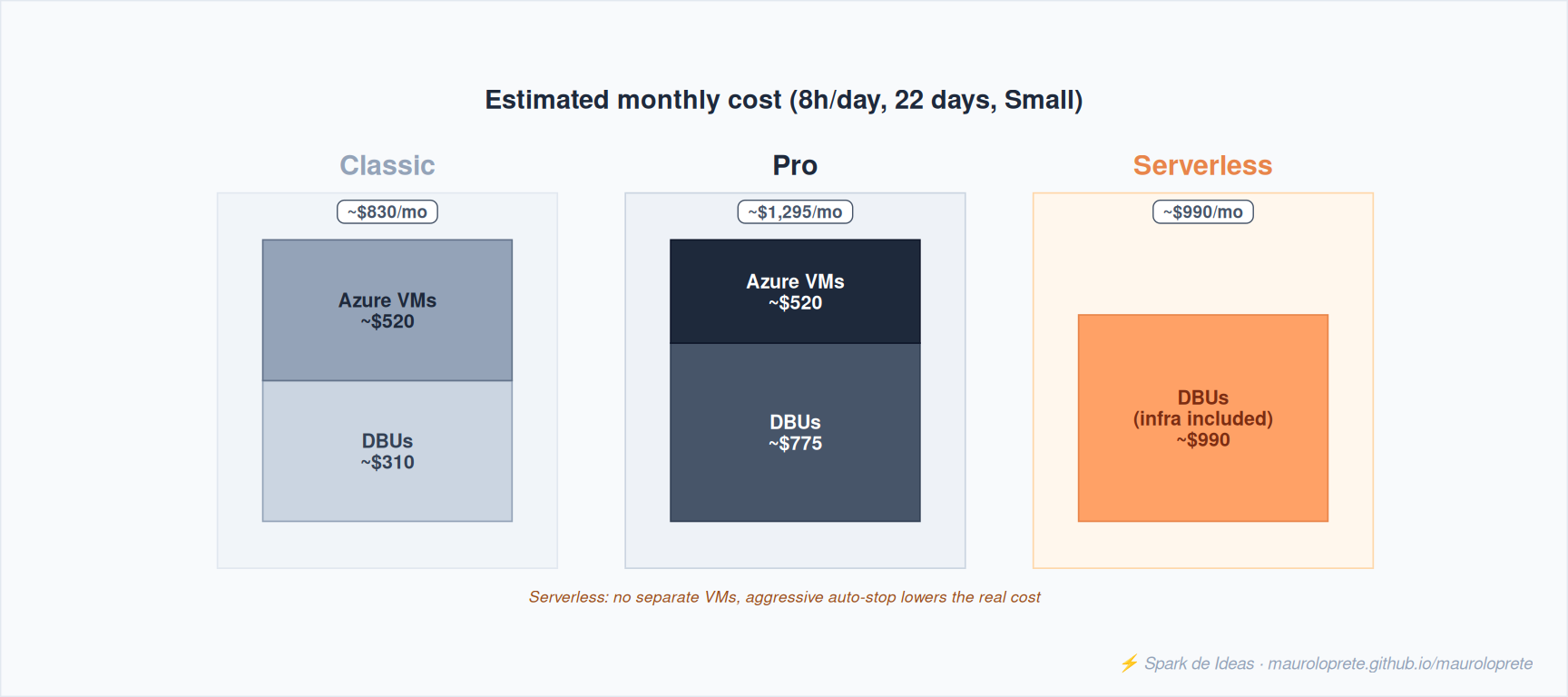
Rules for optimizing costs
1. Aggressive auto-stop
- Serverless: 5 minutes (the UI minimum). It starts in seconds, so there’s no impact.
- Pro/Classic: 10-15 minutes. The 4-minute cold start makes anything lower impractical.
2. Right-sizing
- Monitor spill to disk in the Query Profile → warehouse too small
- Monitor Peak Queued Queries in the Monitoring tab → you need more clusters or a bigger size
- With Serverless, IWM adjusts dynamically — less micro-management
3. Tagging for cost allocation
Implement workspace-level tags to track costs per team:
The tags show up in the billing system tables so you can do per-team chargeback.
4. Efficient queries
- Filter early, select only the columns you need
- Use
ZORDER/OPTIMIZEon the underlying Delta tables - Avoid
SELECT *against large tables - Photon is already enabled — nothing extra to do
9. Serverless Compute for Jobs
Serverless isn’t just for SQL Warehouses. Databricks extended serverless to notebooks, workflows and Lakeflow Declarative Pipelines.
What changes compared to Job Clusters
| Aspect | Job Cluster | Serverless Compute |
|---|---|---|
| Configuration | Instance type, workers, autoscaling | Nothing — Databricks manages everything |
| Startup | 2-5 minutes | Seconds |
| Performance | Depends on your config | Up to 80% better (auto-sizing) |
| Cost | ~$0.15/DBU + VMs | Everything included in the DBU |
| Resilience | Manual (retry config) | Automatic (89% more successful runs) |
Supported task types
- Notebook, Python script, dbt, Python wheel, JAR
Performance modes
- Standard: 70% savings vs Performance-optimized
- Performance-optimized: for latency-critical workloads
NoteRelationship to Tips #8
In the previous post we saw how to configure Jobs with event-driven triggers. Serverless Compute for Jobs is the perfect complement: triggers that fire on their own + compute that starts in seconds = minimal latency without a 24/7 cluster.
10. Gotchas that will save you trouble
SQL Warehouses don’t support continuous streaming. No Structured Streaming with
ProcessingTime. For streaming use Job Clusters or All-Purpose (see Tips #8).SQL Warehouses don’t support ML training. No Spark ML, MLlib, scikit-learn, PyTorch. For ML use Job Clusters with GPU (see Tips #5 and Tips #6).
Serverless Compute doesn’t support R. If your team uses R, you need Classic clusters.
Serverless Compute doesn’t support Spark RDD APIs. Only Spark Connect APIs (DataFrame, SQL). If you have legacy code with RDDs, it has to be migrated.
No
df.cache()or global temp views on Serverless. Databricks handles caching internally. Restructure your code if it depends on these APIs.External Hive metastore = no Serverless. If your workspace uses an external Hive metastore instead of Unity Catalog, Serverless SQL Warehouses aren’t supported. Migrate to UC first.
The Classic/Pro cold start kills the interactive experience. Waiting 4 minutes to run a
SELECT count(*)is unacceptable for analysts. Use Serverless or keep a minimal warehouse always on.Azure’s Standard tier retires in October 2026. If you’re on Standard, expect at least a 35% increase in DBU rates. Plan your migration to Premium.
Only SQL UDFs on SQL Warehouses. No pandas UDFs or vectorized UDFs. For complex transformations that need Python, use a Job Cluster.
Query Federation has no cache. Every query to an external source hits the origin. If you query the same PostgreSQL table 50 times, consider ingesting it into Delta.
11. When NOT to use SQL Warehouses
| Need | Use instead |
|---|---|
| Continuous streaming | Job Cluster + Structured Streaming |
| ML training | Job Cluster with GPU |
| Heavy Python/R notebooks | All-Purpose Cluster |
| ETL with vectorized UDFs | Job Cluster |
| Complex orchestration | Job Cluster + orchestrator |
The full decision table:
| Aspect | SQL Warehouse | All-Purpose | Job Cluster |
|---|---|---|---|
| Use case | SQL analytics, BI, dashboards | Interactive development | Production jobs |
| Languages | SQL | Python, SQL, Scala, R | Python, SQL, Scala, R |
| Optimized for | Concurrent SQL queries | Flexibility | Batch execution |
| Lifecycle | Auto-start/auto-stop | Manual or idle timeout | Automatic with the job |
| DBU cost | $0.22-0.70 | ~$0.55 | ~$0.15 |
| Concurrency | High (multi-cluster) | Medium | Low (1 job/cluster) |
| Photon | Always | Optional | Optional |
| Streaming | No | Yes | Yes |
| ML Training | No | Yes | Yes |
References
- SQL warehouse types — Azure Databricks — Classic vs Pro vs Serverless
- SQL warehouse sizing, scaling, and queuing — T-shirt sizes and concurrency scaling
- What is Photon? — Vectorized C++ engine
- Serverless compute limitations — What you can’t do
- Query Federation — Queries against external sources
- AI Functions — LLMs from SQL
- Query history — Query monitoring
- Query profile — Execution DAG
- Serverless compute for Jobs — Serverless beyond SQL
Other posts in the series
If this post was useful, check out the previous Databricks Tips:
- Tips #1: Databricks Asset Bundles — IaC for Databricks
- Tips #2: Delta Lake — the 7 things you wish you had known
- Tips #3: Unity Catalog — the governance nobody implements right
- Tips #4: Structured Streaming — watermarks, triggers and micro-batch
- Tips #5: MLflow + Unity Catalog — from experiment to model
- Tips #6: Feature Engineering — features that survive production
- Tips #7: Docker on Databricks — custom containers
- Tips #8: Jobs & Workflows — streaming and event-driven triggers
Next week: Delta Live Tables — declarative pipelines with expectations and monitoring.