Databricks Tips #13: OpenSharing — sharing without copying
Databricks Tips
Data Engineering
Delta Lake
What OpenSharing inherits from Delta Sharing and what it adds: true zero-copy, shares to Iceberg clients like Snowflake and Trino, models and agent skills as shareable assets, on-premises storage connected to the lakehouse. With the SQL syntax to build your first share.
Sharing data with another company, the classic way: export to CSV, upload to an SFTP, someone on the other side downloads the file, imports it, and three months later nobody knows which of the four copies is the good one. The “modern” way: a pipeline that replicates tables to the partner’s bucket — which you have to maintain, monitor and pay for, twice.
Delta Sharing came to kill that in 2021 with a simple idea: the receiving side reads your data straight from your storage, no copies. At the Data + AI Summit 2026 (this past June — we covered all the announcements in the DAIS 2026 recap) Databricks announced its evolution: OpenSharing, now an independent project under the Linux Foundation, with a scope that’s no longer just tables — models, agent skills and unstructured data. In this post we look at how the protocol works under the hood, the actual syntax to build shares today, what OpenSharing adds, and the release status of each feature (spoiler: not everything is GA).
NoteTL;DR
- OpenSharing is the evolution of Delta Sharing, not a replacement: same zero-copy protocol, now under the Linux Foundation, backwards compatible with whatever you already have running.
- Zero-copy means the recipient reads your Parquet files straight from your object storage using short-lived URLs — data is never duplicated and never flows through an intermediary server.
- What’s new and already GA: sharing to any Iceberg client (Snowflake, Trino) via the REST Catalog, plus protocol-vended storage credentials for native performance.
- What’s new in preview/beta: sharing models and agent skills, Genie Agents with quotas and controls, Lakebase tables with their change data feed, SecureConnect for corporate networks, and on-premises storage (MinIO is already GA).
- On-premise databases like SQL Server, Oracle, MySQL or Postgres? Not through OpenSharing — that’s what Lakehouse Federation is for: querying them from Unity Catalog without replicating them. And the partner’s SFTP has a managed connector in Lakeflow Connect.
- It’s still read-only, and zero-copy is not zero-cost: storage egress is on you. The math matters when the recipient sits in another region or cloud.
1. From Delta Sharing to OpenSharing: what actually changed
First, what did not change: the data protocol is the same. If you have Delta Sharing shares running today, they keep working — OpenSharing is backwards compatible. What changed is the project’s governance and its scope:
| Delta Sharing (2021–2025) | OpenSharing (2026+) | |
|---|---|---|
| Governance | Open source project led by Databricks | Independent project under the Linux Foundation |
| What you share | Tables and files (Delta, Parquet) | That + Iceberg, models, agent skills, Genie Agents, unstructured data, metrics |
| Who can read | Delta Sharing clients (Spark, pandas, Power BI, another Databricks) | That + any Iceberg client via the REST Catalog: Snowflake, Trino and friends |
| Where the data lives | Your cloud object storage | That + on-premises: MinIO (GA) and more partners on the way |
The scale it starts from is not minor: over 28,000 active data recipients and 33% of shares flowing across different platforms via open connectors. Amadeus, Atlassian, LSEG, SAP and Stripe are among the protocol’s users.
Note
Why does the Linux Foundation matter? Because it lowers the vendor lock-in risk for the receiving side. Adopting a sharing protocol controlled by a single vendor is uncomfortable if you are, say, a Snowflake customer. With neutral governance, connecting stops being a bet on Databricks and becomes a bet on a standard — which is exactly the argument you need to convince the partner on the other side.
2. Zero-copy: how it works under the hood
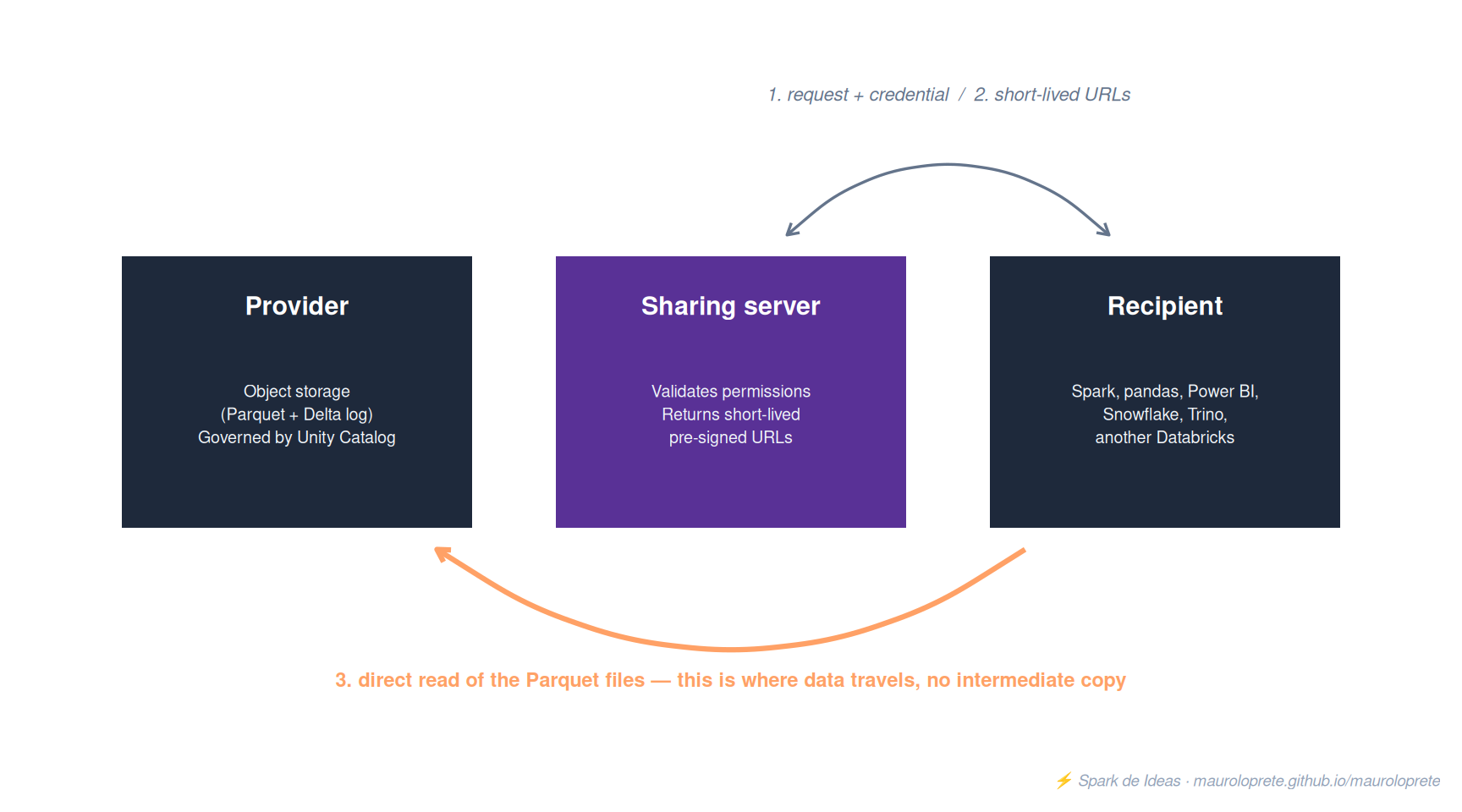
The core of the protocol is that data never flows through an intermediary server. The flow has three steps:
- The recipient asks the provider’s sharing server for a table, authenticating with its credential.
- The server checks against Unity Catalog what that recipient is allowed to see and returns short-lived pre-signed URLs pointing at the table’s Parquet files, directly in the provider’s object storage.
- The recipient reads those files straight from storage, with whatever engine it wants.
Three practical consequences of this design:
- There is no copy that can go stale. The recipient always reads the latest version of the table. If your morning MERGE updated the data, the partner sees it updated in the afternoon without anyone running anything.
- Revoking access is instant. Remove the grant and the next URLs are simply not issued. There’s no “please delete the file” conversation.
- Compute is on the recipient. You don’t pay for their queries — only for the storage you were already paying for (plus egress, which we’ll get to in the gotchas).
4. The receiving side
In Databricks-to-Databricks, the recipient mounts the share as just another catalog and queries it as if it were local:
-- On the recipient side
CREATE CATALOG ventas_de_partner
  USING SHARE `proveedor-x`.ventas_partner;

SELECT * FROM ventas_de_partner.ventas.transacciones_diarias
WHERE fecha >= '2026-07-01';
In open mode, the recipient downloads a credential file (it contains the sharing server endpoint and an access token) and consumes with whatever client they prefer:
import delta_sharing

perfil = "/path/to/config.share"

# Explore what was shared with me
cliente = delta_sharing.SharingClient(perfil)
print(cliente.list_all_tables())

# Read into pandas (small datasets)
df = delta_sharing.load_as_pandas(
    f"{perfil}#ventas_partner.ventas.transacciones_diarias"
)

# Read with Spark (large datasets)
df = (spark.read
      .format("deltaSharing")
      .load(f"{perfil}#ventas_partner.ventas.transacciones_diarias"))
The same share can be read from Power BI, Excel, or any tool with a Delta Sharing connector — and since 2026, from any Iceberg client. Which is exactly the next section.
5. New — Iceberg REST Catalog: sharing to Snowflake without a fight
Until now, if the recipient lived in Snowflake, they needed the Delta Sharing connector. With OpenSharing, the share is also exposed via the Iceberg REST Catalog (the standard API that engines in the Iceberg ecosystem use to discover and read tables — the acronym you’ll see is IRC). Translation: any Iceberg-compatible client can read your share as if it were an Iceberg catalog, without installing anything from Databricks.
What’s available now and what’s coming:
| Capability | Status |
|---|---|
| Share to any Iceberg client (Snowflake, Trino, etc.) | GA |
| Protocol-vended storage credentials (native performance, no proxy) | GA |
| Share foreign Iceberg tables (registered in AWS Glue, Snowflake Open Catalog or any other IRC catalog) | GA announced, on the way |
| Lakebase tables and their change data feed | Public Preview |
Important
The technical detail that makes the difference: OpenSharing-vended storage credentials mean the Iceberg client reads the files straight from object storage with temporary credentials — the same zero-copy move as always, without a server re-serving the data. Without this, “Iceberg compatible” would be a euphemism for “slow”.
NoteDelta vs. Iceberg: what each one is and when to pick which
If you’re wondering why “sharing a Delta table to an Iceberg client” even makes sense: both are open table formats built on top of Parquet. The data is plain Parquet files; what each format adds is a metadata layer on top providing ACID transactions, time travel and schema evolution. The differences:
| Delta Lake | Apache Iceberg | |
|---|---|---|
| Origin | Databricks (open source via delta.io) | Netflix, now an Apache project |
| How it carries metadata | Transaction log in _delta_log/ (JSON + checkpoints) next to the data |
Snapshots and manifests, coordinated by an external catalog |
| Strongest ecosystem | Databricks, Spark | Snowflake, Trino, Flink, BigQuery |
| Strong points | First-class MERGE/upserts, Change Data Feed, native streaming with Structured Streaming, and the whole Databricks optimization stack (Photon, Liquid Clustering, Predictive I/O) works for this format | Partition evolution (changing the partitioning scheme without rewriting the table) and hidden partitioning (the engine derives the partition from an expression — nobody filters on the wrong column); true multi-engine neutrality by design |
And when do you pick which in a big data project?
- If your platform is Databricks/Spark → Delta, no second thoughts: every piece of the stack (engine, optimizer, maintenance tooling) is built and tuned for that format. Choosing anything else there is rowing with your suit on.
- If your architecture is multi-engine by design → Iceberg: when Trino serves ad hoc, Flink does streaming and Snowflake does BI, Iceberg is the only contract everyone speaks as a first-class citizen, with the external catalog acting as referee between engines.
- If you frequently need to re-partition huge tables → Iceberg has the specific technical edge (partition evolution)… although Liquid Clustering in Delta attacks the same pain from another angle: just stop partitioning by hand.
- If you’re on Databricks but interoperability is a requirement → don’t migrate: UniForm exposes your Delta tables as Iceberg, and with OpenSharing the Iceberg client reads them via the REST Catalog. The 2026 answer is that this war is becoming irrelevant: underneath it’s the same Parquet, and “sharing Delta to an Iceberg client” is translating metadata, not data.
We covered Delta in depth in Tips #2.
If you’ve been following the Delta vs. Iceberg feud, notice the move: the format war is being settled from above, at the protocol layer. You share a Delta table and the other side reads it as Iceberg. The table format becomes an implementation detail of the provider.
6. New — AI assets: models, agent skills and Genie Agents
Here’s OpenSharing’s conceptual leap: what gets shared stops being just data. The protocol now covers:
- AI models: share a model registered in Unity Catalog so the partner can load and serve it on their side, without sending the weights over WeTransfer. This is not keynote vaporware — it’s documented and operational: the model is added to the share like any table (you need the
EXECUTEprivilege on it, and must keep it) and the recipient loads it for inference from their mounted catalog. - Agent skills: an agent’s reusable logic — tools, instructions, semantic context — packaged and shareable across organizations. This is the most “protocol” and least “product” part for now: it appears as a capability of the standard in the official announcement, with tooling arriving gradually.
- Genie Agents (Beta): you share a natural-language chat experience over your data (official doc). The technical detail that’s not in the keynotes: what gets shared is a point-in-time snapshot of the Genie Space — the data assets and instructions are frozen at share time, and if you modify the space afterwards, the share does not update (all recipients see the same snapshot). The recipient mounts the share and gets a preloaded local Genie Space. Two concrete requirements: the Genie Agent Sharing preview enabled at the account level, and the space configuration under 256 KB compressed. We anticipated this announcement in DAIS day 3.
For the Genie case, the provider-side controls are the strong point (and something worth configuring from day one):
- Hide the agent’s proprietary instructions (your prompt engineering doesn’t travel).
- Restrict data access to go through the agent only — the recipient converses, it doesn’t query.
- Daily prompt quota per recipient.
- Row export cap on responses.
Warning
“Sharing an agent” sounds like a keynote demo, but the real use case is concrete: you’re a data provider, and instead of delivering 40 tables with an 80-page data dictionary, you deliver an agent that knows them. The recipient’s onboarding cost drops from weeks to a conversation. That said: it’s in Beta — try it with a friendly partner before selling it as a product.
7. New — on-premises and SecureConnect
The other frontier OpenSharing crosses: data no longer has to be in the cloud to be shareable. On-premises storage can plug directly into the protocol:
| Storage partner | Status |
|---|---|
| MinIO | GA |
| Everpure (formerly Pure Storage) | Private Preview |
| Qumulo | Private Preview (July 2026) |
| VAST Data | Private Preview (August 2026) |
| Cohesity, Commvault, HPE, NetApp, Nutanix, Rubrik | Announced for end of 2026 |
So what is MinIO, the only one already GA? An open source, S3 API-compatible object storage that runs wherever you want: your own servers, a Kubernetes cluster, a private datacenter. It’s the de facto standard for having “an S3 indoors” — the same APIs and tooling as the cloud ecosystem, without the cloud. That’s why it’s the natural partner to start with: if your on-prem data already lives in MinIO as Parquet or Delta, it already speaks the language the protocol needs.
A concrete example of the flow, with a typical case in our region — the company that, by regulation (or internal policy), can’t move certain data to the cloud:
- The historical data lives as Delta tables on a MinIO cluster in the company’s own datacenter. It stays there.
- That MinIO is registered as an OpenSharing source, and the tables become governed by Unity Catalog like any others.
- Analysts query from Databricks serverless — or ask Genie in natural language — and the engine reads the files straight from MinIO using short-lived URLs, just as if it were an S3 bucket.
- Nothing was replicated to the cloud: what travels is each query’s result, not the dataset. And the replication pipeline someone on the team maintains today ceases to exist.
And for the headache of connecting corporate networks, SecureConnect (Public Preview): a Databricks-managed proxy that eliminates per-recipient firewall configuration. You set it up once, and adding new recipients doesn’t require touching network rules — which in a large company means not opening an infrastructure ticket for every new partner.
Rounding out the multi-cloud combo: Global Distribution (Private Preview) — automatic cross-region and cross-cloud replication to cut egress and latency — and cross-regulatory domain sharing (Public Preview) for sharing between Databricks environments living under different regulations.
8. What about my on-premise databases? Federation, SFTP and the end of copy pipelines
The question that comes up as soon as you tell this story inside a company around here: “I have an on-premise SQL Server (or Oracle, MySQL, PostgreSQL) with 15 years of history — can I share it like this?”. Honest answer: not directly through OpenSharing — the protocol shares files from object storage, and your relational database doesn’t expose Parquet. But the underlying question is a different one: “can I work with that data without building copy pipelines?”. And there the answer is yes, with two pieces that complement OpenSharing:
Lakehouse Federation for relational databases: you register the connection in Unity Catalog and the whole database shows up as just another catalog — queried without replicating anything:
-- Once: the connection and the foreign catalog
CREATE CONNECTION sqlserver_onprem TYPE sqlserver
  OPTIONS (host 'srv-ventas.interno', port '1433',
           user secret('kv', 'fed-user'), password secret('kv', 'fed-pass'));

CREATE FOREIGN CATALOG ventas_legacy
  USING CONNECTION sqlserver_onprem
  OPTIONS (database 'ventas');

-- Then: plain SQL, without copying a single row
SELECT * FROM ventas_legacy.dbo.clientes WHERE alta >= '2026-01-01';
It supports SQL Server, Oracle, MySQL, PostgreSQL, Snowflake, Redshift, BigQuery and more — all read-only and governed by Unity Catalog. The technical nuance that matters: there are no pre-signed URLs here. Each query travels over JDBC (Java Database Connectivity, the standard database connector protocol) to the source database: filters and aggregations get pushed down for the database to resolve, and Databricks finishes the rest of the plan. No replicas to maintain, but with a clear limit: if you point 40 dashboards at the production transactional database, the transactional system is what suffers. Federation is for access, exploration and integration — not for sustained analytical volume on an OLTP system (online transaction processing: the database serving the business’s live operations).
Lakeflow Connect with the SFTP connector for the other classic: the partner that “shares” by dropping files on an SFTP server (Secure File Transfer Protocol — the remote shared folder of a lifetime). The managed connector does incremental ingestion with exactly-once guarantees, schema inference and evolution, credentials governed in Unity Catalog, and reads CSV, JSON, XML, Parquet, Avro and ORC. Here there is a copy — it’s ingestion, not sharing — but it’s a declarative connector, not a handcrafted pipeline someone has to maintain. And for the opposite direction — you dropping files on an SFTP for the partner — that’s exactly what OpenSharing comes to retire.
So which of the paths should you pick for the on-premise database? Because there are actually three, not two. Besides Federation, OpenSharing enables a new pattern: your ETL writes Delta or Iceberg tables into an on-prem MinIO, and Databricks mounts them as a catalog via AIStor Table Sharing — the transactional database is touched once per load cycle, and the data never leaves the datacenter. And if the data can go to the cloud, the third route is Lakeflow Connect with managed CDC straight into the lakehouse. The decision table:
| Direct Federation | RDBMS → Delta on MinIO → OpenSharing | Lakeflow Connect (CDC to the cloud) | |
|---|---|---|---|
| ETL you maintain | None | The pipeline to Delta/Iceberg | None (managed connector) |
| Freshness | Current state, always | Your pipeline’s frequency | Near real-time (CDC) |
| Impact on the source database | Every query hits it | One pass per cycle | Continuous change log reads |
| Analytical performance | Limited (partial pushdown) | Full columnar | Full columnar |
| Does data leave the datacenter? | No (results travel, per query) | No | Yes — it lands in the lakehouse |
| When | Ad hoc, POCs, occasional queries | Heavy consumption + data that must stay on-prem | Heavy consumption + cloud is allowed |
The short rule: occasional exploration → Federation; an OLTP to protect and regulation anchoring data on-prem → MinIO + OpenSharing; cloud is allowed → Lakeflow Connect. And a shortcut that shows up often: if you already have a process dumping the databases to Parquet, half the cost of the MinIO pattern is already paid — going from loose Parquet to Delta and enabling Table Sharing is the short step.
TipGoodbye, Data Factory (and the data-moving tools)?
Add up the three pieces: Federation queries the databases without copying them, Lakeflow Connect ingests what actually needs to be brought in (SFTP included, plus managed CDC — incremental change capture — from SQL Server), and OpenSharing distributes outward without exports. The “Copy Activity + Linked Services + triggers” pattern of Azure Data Factory — which in practice is 80% of the production ADFs out there — now has a complete native replacement inside the lakehouse, with governance in a single place.
And it’s not just Data Factory: it applies to the whole category of tools that lived off that gap. Fivetran — for years the recommended path for managed connectors into Databricks, until Lakeflow Connect took over that role natively — and also Airbyte, Stitch, or the Informatica and Talend jobs that just move tables from one side to the other. They all still make sense for orchestrating or ingesting outside the ecosystem; as the official data copiers in and out of the lakehouse, retirement has arrived.
10. When to use it: the three cases that justify building it today
- Sharing with external partners — the obvious one. It replaces SFTPs, scheduled exports and mirror buckets. If you have a pipeline today whose only job is copying data to someone, it’s a direct candidate.
- Internal multi-org — corporate groups with several units, each with its own metastore or cloud. Sharing across branches while respecting data residency, without cross-replication.
- Monetization — publishing datasets (or agents, now) on Databricks Marketplace, which runs on OpenSharing. The recipient gets frictionless access and the platform handles distribution.
11. Gotchas
- Zero-copy is not zero-cost: egress exists. The recipient reads from your storage — if they sit in another region or cloud, the egress for those reads lands on your storage bill. For heavy cross-cloud shares, do the math first; Global Distribution (preview) targets exactly this.
- Without
WITH HISTORY, there’s no time travel or CDF on the other side. If the recipient needs to read the change data feed or previous versions, the table must be shared with history — and CDF additionally has to be enabled on the table before sharing it. Watch the default: on DBR 16.2+ tables are addedWITH HISTORYby default; on earlier runtimes, without history. - Token lifetime is configured at the metastore level — keep it short. For open protocol recipients, tokens are valid for at most one year, but a year is an eternity: set a short lifetime and rotate. A valid token sitting in the inbox of someone who no longer works at the partner is an incident waiting for a date.
- New Delta features can break old clients. A table with deletion vectors or column mapping enabled requires sharing clients that can read in Delta format. If your recipient uses an old connector, coordinate versions before enabling features on the shared table.
- Each feature’s status matters. From this post: Iceberg clients and vended credentials are GA; SecureConnect and Lakebase sharing, Public Preview; Genie Agent Sharing, Beta; Global Distribution, Private Preview. Don’t build your commercial roadmap on a private preview.
- Views as the interface, but watch the heavy logic. Sharing a view with 14 joins transfers that compute cost to every recipient query. For stable interfaces over complex logic, materialize first.
- The share’s name is part of the contract. The recipient mounts the share and references its schemas and tables by name. Renaming things inside a share breaks other people’s queries — ones you neither see nor control.
12. When NOT to use OpenSharing
| Situation | Why | Alternative |
|---|---|---|
| Sharing within the same metastore | It adds an unnecessary layer of indirection | Regular Unity Catalog GRANT |
| The recipient needs to write | The protocol is read-only by design | Workspace access, or reverse ingestion as an explicit pipeline |
| One-shot transfer with change of ownership | You don’t want a live link, you want to hand over and disconnect | DEEP CLONE or a one-off export |
| Strict query latency SLA for a recipient across the world | Every query crosses regions; physics doesn’t negotiate | Regional replica (or Global Distribution once it leaves preview) |
| The partner only accepts “just send me the file” | The protocol requires the recipient to consume, not to receive | Scheduled export — and a conversation about 2026 |
References
- What is OpenSharing? — Azure Databricks
- Create shares for OpenSharing
- Create recipients for OpenSharing
- Share a Genie Space using OpenSharing (Beta)
- OpenSharing — product page
- Introducing OpenSharing — Databricks Blog
- New OpenSharing and Marketplace capabilities — Databricks Blog
- Databricks storage ecosystem: zero-copy over on-premises data — Databricks Blog
- AIStor Table Sharing: on-prem tables mounted in Databricks — MinIO Blog
- Press release: Databricks announces OpenSharing
- Lakehouse Federation — Azure Databricks
- Ingest files from SFTP servers — Azure Databricks
- Delta Sharing on GitHub
Other posts in the series
If this post was useful, check out the previous Databricks Tips:
- Tips #1: Databricks Asset Bundles — IaC for Databricks
- Tips #2: Delta Lake — the 7 things you wish you’d known
- Tips #3: Unity Catalog — governance nobody implements well
- Tips #4: Structured Streaming — watermarks, triggers and micro-batch
- Tips #5: MLflow + Unity Catalog — from experiment to model
- Tips #6: Feature Engineering — features that survive production
- Tips #7: Docker on Databricks — custom containers
- Tips #8: Jobs & Workflows — streaming and event-driven triggers
- Tips #9: SQL Warehouses — the compute that turns itself on
- Tips #10: AI Gateway — centralized governance for LLMs
- Tips #11: Lakeflow Declarative Pipelines — declarative pipelines with built-in quality
- Tips #12: Photon — the C++ engine that speeds up your queries without changing code
Next in the series: Liquid Clustering, the replacement for partitions and Z-ORDER.