Databricks Tips #11: Lakeflow Declarative Pipelines (ex DLT) — declarative pipelines with built-in quality
Databricks Tips
Data Engineering
Streaming
Streaming tables, materialized views, expectations, AUTO CDC with SCD Type 1/2, triggered vs continuous modes, serverless, and the gotchas that aren’t in the tutorial.
You write a Spark Structured Streaming pipeline. It works. You put it in production. Three weeks later it breaks because the source schema changed, nobody noticed that 15% of the rows have nulls in the primary key, and the MERGE you built for CDC has a subtle bug with out-of-order events.
Lakeflow Declarative Pipelines (formerly known as Delta Live Tables / DLT) solves exactly that: you declare what you want and the framework takes care of the how.
NoteTL;DR
- Streaming tables for incremental ingestion, materialized views for aggregations, views for intermediate logic.
- Expectations validate quality on every record: warn, drop, or fail.
- AUTO CDC replaces your manual MERGE with SCD Type 1 and Type 2 out of the box.
- Triggered mode for efficient batch, continuous for sub-minute latency.
- Serverless adds vertical autoscaling and stream pipelining with zero compute configuration.
- Requires the Premium plan.
0. The rename: DLT → Lakeflow Declarative Pipelines
Databricks renamed Delta Live Tables to Lakeflow Declarative Pipelines (SDP). The Python module is now pyspark.pipelines. The functionality is the same; the name reflects that the core was open-sourced as part of Apache Spark 4.1.
In this post I use “DLT” and “SDP” interchangeably — the industry still says “DLT” and Databricks still accepts both names.
1. The 3 dataset types
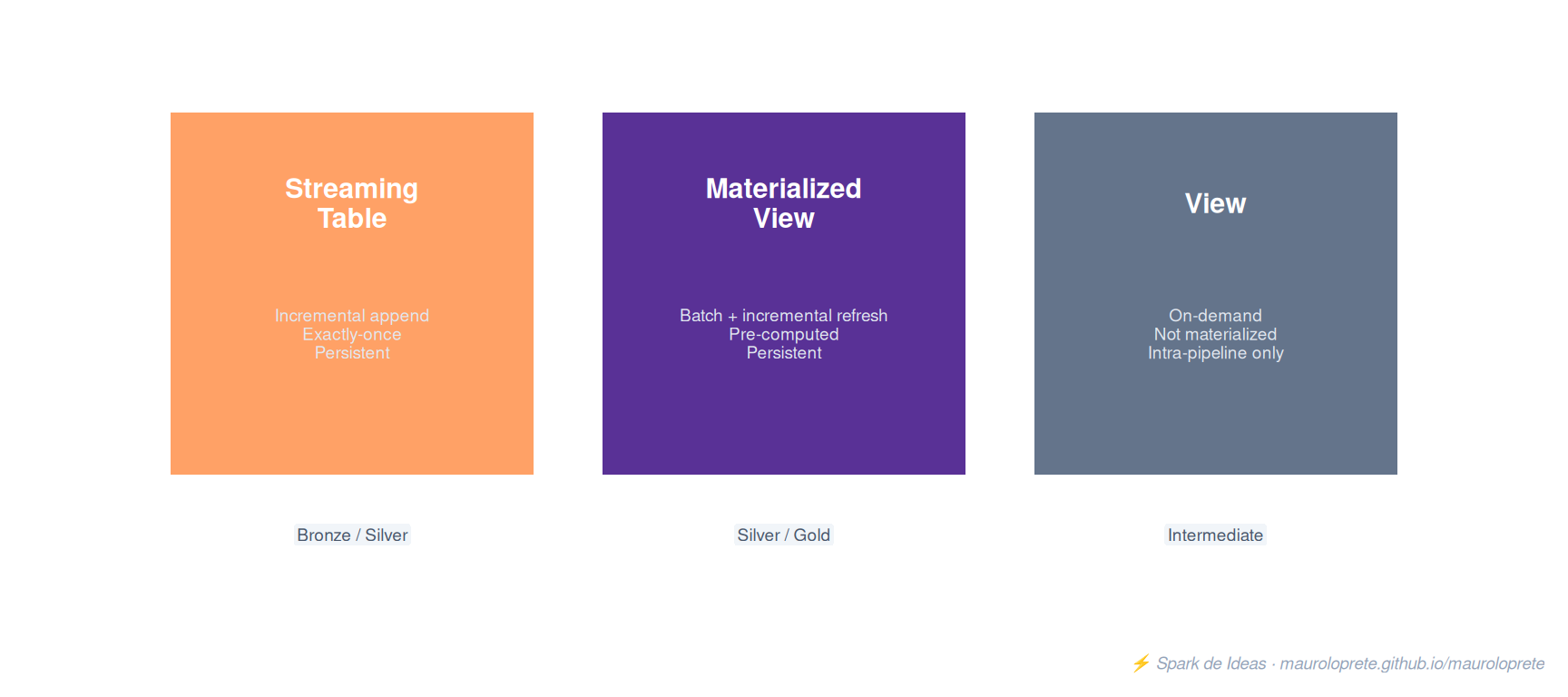
Streaming Table
A persistent Delta table that processes each record exactly once (append-only by default). Ideal for ingestion from cloud storage, Kafka, Event Hubs.
CREATE OR REFRESH STREAMING TABLE raw_transactions
AS SELECT * FROM STREAM read_files(
  '/Volumes/catalog/schema/volume/transactions/',
  format => 'json'
)from pyspark import pipelines as dp
@dp.table
def raw_transactions():
return (
spark.readStream
.format("cloudFiles")
.option("cloudFiles.format", "json")
.load("/Volumes/catalog/schema/volume/transactions/")
)Materialized View
A persistent Delta table with incremental refresh. It recomputes efficiently by only processing new data or changes. Ideal for aggregations, expensive joins, and Gold tables.
CREATE OR REFRESH MATERIALIZED VIEW daily_revenue
AS SELECT
  transaction_date,
  segment,
  SUM(amount) AS total_revenue,
  COUNT(*) AS transaction_count
FROM silver_transactions
GROUP BY transaction_date, segment@dp.materialized_view
def daily_revenue():
return (
spark.read.table("silver_transactions")
.groupBy("transaction_date", "segment")
.agg(
F.sum("amount").alias("total_revenue"),
F.count("*").alias("transaction_count"),
)
)View (temporary)
Doesn’t materialize data. It’s computed on demand when another dataset in the pipeline queries it. It doesn’t exist outside the pipeline.
CREATE TEMPORARY VIEW valid_transactions
AS SELECT *
FROM STREAM(raw_transactions)
WHERE amount > 0 AND customer_id IS NOT NULL
Comparison table
| Aspect | Streaming Table | Materialized View | View |
|---|---|---|---|
| Processing | Incremental streaming | Batch with incremental refresh | On-demand |
| Persists data | Yes | Yes | No |
| Visible outside the pipeline | Yes | Yes | No |
| Time travel (Delta) | Yes | No | No |
| AUTO CDC target | Yes | No | No |
| DML support (INSERT/UPDATE) | Yes | No | No |
| Typical use case | Ingestion, CDC | Aggregations, Gold | Intermediate logic |
2. Expectations: declarative data quality
Expectations are quality rules applied record by record. Three possible behaviors:
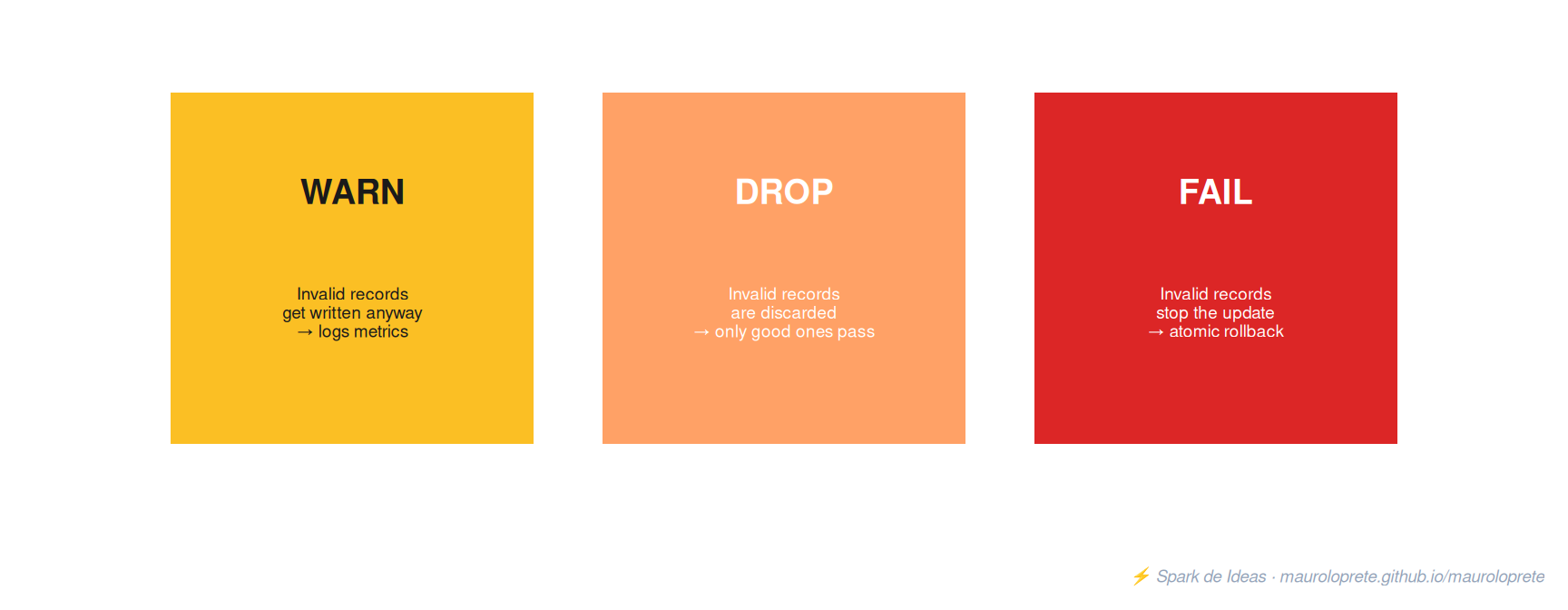
| Action | SQL | Python | Invalid records… |
|---|---|---|---|
| Warn | EXPECT |
@dp.expect |
Get written, metrics are logged |
| Drop | EXPECT ... ON VIOLATION DROP ROW |
@dp.expect_or_drop |
Silently discarded |
| Fail | EXPECT ... ON VIOLATION FAIL UPDATE |
@dp.expect_or_fail |
Stop the pipeline (rollback) |
Full example in SQL
CREATE OR REFRESH STREAMING TABLE silver_transactions (
  -- Warn: logs but lets it through
  CONSTRAINT valid_amount
    EXPECT (amount > 0),

  -- Drop: discards invalid rows
  CONSTRAINT valid_customer
    EXPECT (customer_id IS NOT NULL AND email IS NOT NULL)
    ON VIOLATION DROP ROW,

  -- Fail: stops the pipeline on violation
  CONSTRAINT valid_currency
    EXPECT (currency IN ('USD', 'EUR', 'ARS', 'UYU'))
    ON VIOLATION FAIL UPDATE
)
AS SELECT
  transaction_id,
  customer_id,
  email,
  amount,
  currency,
  transaction_date,
  current_timestamp() AS _silver_timestamp
FROM STREAM(raw_transactions)
Python example with expect_all
quality_rules = {
    "valid_amount": "amount > 0",
    "valid_customer": "customer_id IS NOT NULL",
    "valid_email": "email IS NOT NULL",
}

@dp.table
@dp.expect_all_or_drop(quality_rules)
def silver_transactions():
    return (
        spark.readStream.table("raw_transactions")
        .withColumn("_silver_timestamp", F.current_timestamp())
    )
Pattern: quarantine (keep the rejects)
Instead of discarding records, route the invalid ones to a quarantine table for investigation:
@dp.table
@dp.expect_or_drop("valid_record", "customer_id IS NOT NULL AND amount > 0")
def silver_transactions():
    return spark.readStream.table("raw_transactions")

@dp.table
def quarantine_transactions():
    return (
        spark.readStream.table("raw_transactions")
        .filter("customer_id IS NULL OR amount <= 0")
    )
ImportantExpectation limitations
- Constraints are boolean SQL expressions. They cannot use custom Python functions, calls to external APIs, or subqueries against other tables.
failmetrics are not recorded (the pipeline fails before logging).- Not supported with
AUTO CDC FROM SNAPSHOT.
3. AUTO CDC: Change Data Capture without the pain
AUTO CDC (formerly APPLY CHANGES INTO) handles Change Data Capture automatically: deduplication, out-of-order events, SCD Type 1 and Type 2. What used to be hundreds of lines of manual MERGE.
Requires the Pro or Advanced edition (or serverless).
SCD Type 1: latest version only
CREATE OR REFRESH STREAMING TABLE customers_current;

CREATE FLOW apply_customers_cdc
AS AUTO CDC INTO customers_current
FROM STREAM(raw_customers_cdc)
KEYS (customer_id)
APPLY AS DELETE WHEN operation = 'DELETE'
SEQUENCE BY updated_at
COLUMNS * EXCEPT (operation, updated_at)
STORED AS SCD TYPE 1;dp.create_streaming_table("customers_current")
dp.create_auto_cdc_flow(
target="customers_current",
source="raw_customers_cdc",
keys=["customer_id"],
sequence_by=col("updated_at"),
apply_as_deletes=expr("operation = 'DELETE'"),
except_column_list=["operation", "updated_at"],
stored_as_scd_type=1,
)SCD Type 2: full history
SCD Type 2 keeps every version of each record with __START_AT and __END_AT columns:
CREATE OR REFRESH STREAMING TABLE customers_history;

CREATE FLOW apply_customers_history
AS AUTO CDC INTO customers_history
FROM STREAM(raw_customers_cdc)
KEYS (customer_id)
APPLY AS DELETE WHEN operation = 'DELETE'
SEQUENCE BY updated_at
COLUMNS * EXCEPT (operation, updated_at)
STORED AS SCD TYPE 2;
Result for a customer who changed cities:
| customer_id | name | city | __START_AT | __END_AT |
|---|---|---|---|---|
| 125 | Mercedes | Tijuana | 2 | 5 |
| 125 | Mercedes | Mexicali | 5 | 6 |
| 125 | Mercedes | Guadalajara | 6 | null (active) |
Tracking only some columns
If you don’t want a new version for every minor change:
STORED AS SCD TYPE 2
TRACK HISTORY ON * EXCEPT (last_login, session_count)
Changes to last_login or session_count update the current record without creating a new version.
TipTip: sequencing with multiple columns
If your source doesn’t have a unique timestamp, you can use a struct:
SEQUENCE BY STRUCT(timestamp_col, id_col)4. Pipeline modes: triggered vs continuous
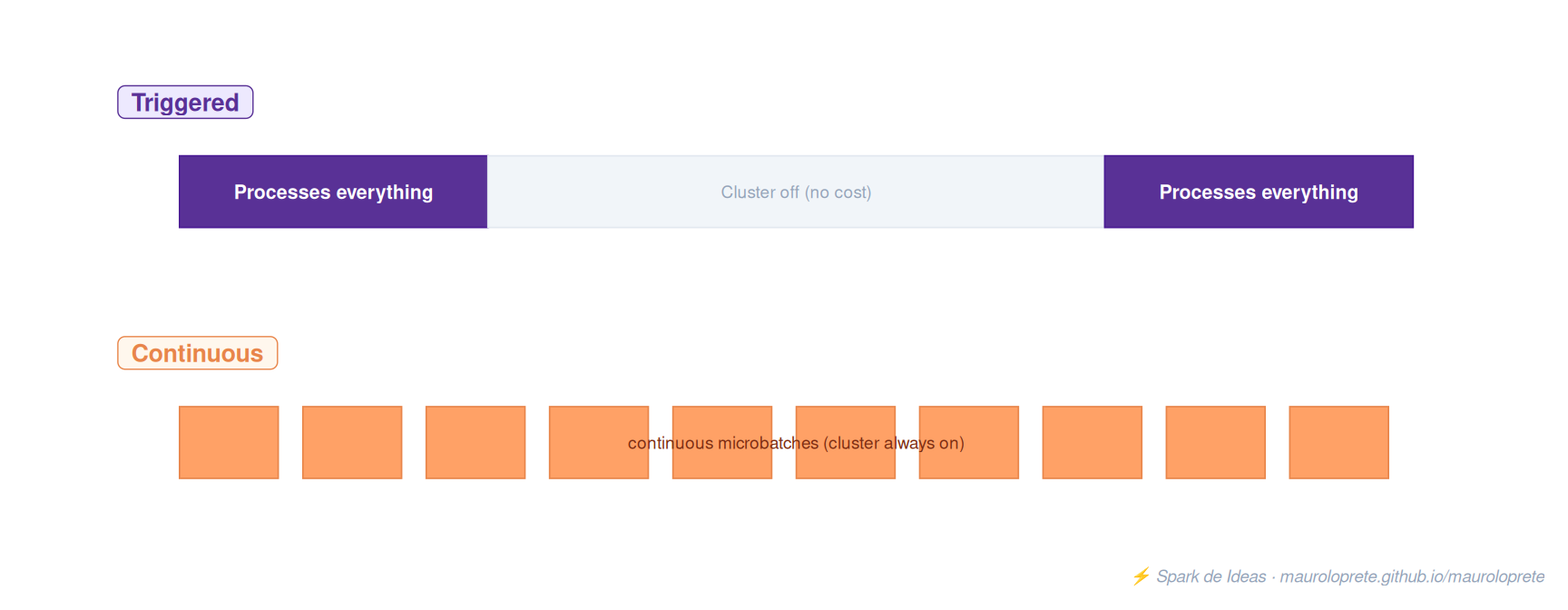
| Triggered | Continuous | |
|---|---|---|
| When it stops | Automatically on completion | Runs until manually stopped |
| What it processes | Data available at update time | Data as it arrives |
| Latency | Minutes to hours (per schedule) | 10 seconds to a few minutes |
| Cost | Cluster only runs as needed | Cluster always on |
| Use case | Most pipelines | Sub-minute latency |
Rule: always start with triggered. Only use continuous if you have a real sub-minute latency requirement. 90% of pipelines don’t need it.
Trigger interval in continuous
@dp.table(spark_conf={"pipelines.trigger.interval": "10 seconds"})
def streaming_silver():
    return spark.readStream.table("raw_transactions")
Product editions
| Edition | CDC | Expectations | Update retention |
|---|---|---|---|
| Core | No | No | 5 days |
| Pro | Yes | No | 30 days |
| Advanced | Yes | Yes | 30 days |
If you use serverless, all features are included without picking an edition.
5. Medallion with DLT: the full pattern
The Medallion architecture is a perfect fit for DLT. A full Bronze → Silver → Gold pipeline:
Full pipeline in SQL
-- ========== BRONZE: raw ingestion ==========
CREATE OR REFRESH STREAMING TABLE bronze_transactions
AS SELECT
  *,
  current_timestamp() AS _ingest_timestamp,
  _metadata.file_path AS _source_file
FROM STREAM read_files(
  '/Volumes/catalog/schema/volume/transactions/',
  format => 'json'
);

-- ========== SILVER: cleaning + validation ==========
CREATE OR REFRESH STREAMING TABLE silver_transactions (
  CONSTRAINT valid_amount
    EXPECT (amount > 0),
  CONSTRAINT valid_customer
    EXPECT (customer_id IS NOT NULL)
    ON VIOLATION DROP ROW
)
AS SELECT
  transaction_id,
  customer_id,
  UPPER(TRIM(email)) AS email,
  CAST(amount AS DECIMAL(18,2)) AS amount,
  currency,
  CAST(transaction_date AS DATE) AS transaction_date,
  current_timestamp() AS _silver_timestamp
FROM STREAM(bronze_transactions);

-- ========== GOLD: business model ==========
CREATE OR REFRESH MATERIALIZED VIEW gold_daily_revenue
AS SELECT
  transaction_date,
  currency,
  COUNT(*) AS transaction_count,
  SUM(amount) AS total_revenue,
  AVG(amount) AS avg_ticket,
  COUNT(DISTINCT customer_id) AS unique_customers
FROM silver_transactions
GROUP BY transaction_date, currency;
Pipeline in Python
from pyspark import pipelines as dp
from pyspark.sql import functions as F

# Bronze
@dp.table
def bronze_transactions():
    return (
        spark.readStream
        .format("cloudFiles")
        .option("cloudFiles.format", "json")
        .load("/Volumes/catalog/schema/volume/transactions/")
        .withColumn("_ingest_timestamp", F.current_timestamp())
    )

# Silver
quality_rules = {
    "valid_amount": "amount > 0",
    "valid_customer": "customer_id IS NOT NULL",
}

@dp.table
@dp.expect_all_or_drop(quality_rules)
def silver_transactions():
    return (
        spark.readStream.table("bronze_transactions")
        .withColumn("email", F.upper(F.trim(F.col("email"))))
        .withColumn("amount", F.col("amount").cast("decimal(18,2)"))
        .withColumn("_silver_timestamp", F.current_timestamp())
    )

# Gold
@dp.materialized_view
def gold_daily_revenue():
    return (
        spark.read.table("silver_transactions")
        .groupBy("transaction_date", "currency")
        .agg(
            F.count("*").alias("transaction_count"),
            F.sum("amount").alias("total_revenue"),
            F.avg("amount").alias("avg_ticket"),
            F.countDistinct("customer_id").alias("unique_customers"),
        )
    )
TipTip: separate ingestion from transformation
In production, separate the ingestion pipeline (Bronze) from the transformation one (Silver/Gold). A failure in the transformation doesn’t block ingestion, and each pipeline can have its own schedule and scaling.
6. Event log: monitoring and metrics
The event log records everything that happens in the pipeline: data quality, progress, lineage, autoscaling.
Querying quality metrics
SELECT
  row_exp.dataset AS dataset,
  row_exp.name AS expectation,
  SUM(row_exp.passed_records) AS passing,
  SUM(row_exp.failed_records) AS failing
FROM (
  SELECT explode(
    from_json(
      details:flow_progress:data_quality:expectations,
      'array<struct<name:string, dataset:string, passed_records:int, failed_records:int>>'
    )
  ) AS row_exp
  FROM event_log('<pipeline_id>')
  WHERE event_type = 'flow_progress'
)
GROUP BY row_exp.dataset, row_exp.name
Querying lineage
SELECT
  details:flow_definition.output_dataset AS output,
  details:flow_definition.input_datasets AS inputs,
  details:flow_definition.flow_type AS type
FROM event_log('<pipeline_id>')
WHERE details:flow_definition IS NOT NULL
Querying DBU consumption
SELECT
  sku_name,
  usage_date,
  SUM(usage_quantity) AS dbus
FROM system.billing.usage
WHERE usage_metadata.dlt_pipeline_id = '<pipeline_id>'
GROUP BY sku_name, usage_date
ORDER BY usage_date DESC
Publishing the event log as a table
By default the event log is only accessible via the event_log() function. To share it:
{
  "event_log": {
    "catalog": "analytics",
    "schema": "monitoring",
    "name": "dlt_event_log"
  }
}
7. Serverless DLT: what changes
| Aspect | Classic compute | Serverless |
|---|---|---|
| Configuration | Instance type, min/max workers, enhanced mode | Nothing — Databricks manages everything |
| Horizontal autoscaling | Enhanced autoscaling | Always enabled |
| Vertical autoscaling | No | Yes — detects OOM and upgrades the instance type |
| Stream pipelining | Sequential (one microbatch at a time) | Concurrent (better throughput) |
| Incremental refresh (MVs) | Limited | Always available |
| Startup | 4-6 min (standard), faster with pools | Seconds |
Vertical autoscaling
Serverless automatically detects out-of-memory errors and provisions larger instance types. If it later detects underutilized memory, it scales back down. You don’t configure anything.
Stream pipelining
Instead of processing microbatches sequentially (the classic Structured Streaming mode), serverless runs microbatches concurrently, improving utilization and throughput.
Two performance modes
| Mode | Typical startup | DBU cost | When to use it |
|---|---|---|---|
| Standard | 4-6 min | Lower | Most pipelines |
| Performance-optimized | Seconds | Higher | Latency-critical pipelines |
NoteServerless requirements
- Unity Catalog enabled
- A region with serverless support
- When converting to serverless, all compute configurations are lost. If you go back to non-serverless, you have to reconfigure.
8. Enhanced autoscaling
Enhanced autoscaling is the default for new pipelines. It’s optimized for streaming workloads and scales proactively.
Differences vs standard autoscaling
- Standard: only removes idle nodes (can be slow to react)
- Enhanced: proactively removes underutilized nodes, guaranteeing no failed tasks during shutdown
Metrics it uses to scale
- Task slot utilization: ratio of occupied slots / total available
- Task queue size: tasks waiting to run
Configuration
{
  "clusters": [{
    "autoscale": {
      "min_workers": 2,
      "max_workers": 10,
      "mode": "ENHANCED"
    }
  }]
}
TipBest practice
Leave min_workers at the default. Set max_workers based on your budget. On serverless, you configure nothing — autoscaling is automatic in both directions.
9. Private tables and access control
Private tables
If a table is intermediate and you don’t need to expose it outside the pipeline:
CREATE PRIVATE STREAMING TABLE internal_staging
AS SELECT * FROM STREAM(raw_data)
WHERE valid = true
Row filters
You can apply row-level security directly in the definition:
CREATE OR REFRESH STREAMING TABLE orders (
  CONSTRAINT valid_id EXPECT (id IS NOT NULL)
)
WITH ROW FILTER region_filter ON (region)
AS SELECT * FROM STREAM(raw_orders)
WarningWatch out for row filters + MVs
If you create a materialized view over a source with row filters or column masks, the refresh is always a full refresh (not incremental). It can significantly impact cost.
10. DLT vs Structured Streaming: when to use each
| Criterion | Lakeflow SDP | Plain Structured Streaming |
|---|---|---|
| Automatic CDC | Native (AUTO CDC, SCD 1/2) | Manual MERGE, DIY dedup |
| Data quality | Expectations with metrics | Ad-hoc validations |
| Lineage | Automatic in Unity Catalog | Manual |
| Orchestration | Automatic (DAG, multi-level retry) | Manual with Jobs |
| Monitoring | Event log + pipeline UI | StreamingQueryListener |
| Incremental MV refresh | Native on serverless | Custom logic |
| Flexibility | Opinionated, within the framework | Full control |
| Required plan | Premium | Any |
| Custom JARs | No (Python only) | Yes |
| Sub-second latency | Only with real-time mode (beta) | Native |
Rule: if you’re building pipelines in the lakehouse (bronze/silver/gold) and you have the Premium plan, use DLT. If you need granular control over checkpoints, output modes, or custom sinks, use Structured Streaming directly.
In practice, many teams combine both: DLT for the core of the pipeline and Jobs with Structured Streaming for the edge cases DLT doesn’t cover.
11. Gotchas
1. Streaming tables are append-only by default. If your source has updates or deletes (for example, another streaming table modified with DML), you need the skipChangeCommits flag or CDF.
2. Materialized views are not streaming sources outside the pipeline. An MV created in one pipeline can’t be used as a readStream in another pipeline or notebook. For that, use streaming tables.
3. Watch out for for loops in Python.
# BAD: every table reads the last table in the loop
for name in table_names:
    @dp.table(name=name)
    def create_table():
        return spark.read.table(name)  # name is evaluated lazily

# GOOD: capture the value with a default argument
for name in table_names:
    @dp.table(name=name)
    def create_table(t=name):
        return spark.read.table(t)
4. pipelines.reset.allowed = false to protect data. If you run manual DML on a streaming table (e.g. GDPR deletes), a full refresh recomputes it from scratch and you lose the changes. Protect it:
CREATE OR REFRESH STREAMING TABLE protected_table
TBLPROPERTIES(pipelines.reset.allowed = false)
AS SELECT * FROM STREAM read_files('...')
5. Identity columns + AUTO CDC = no. Identity columns are not supported on AUTO CDC targets. Use business keys.
6. The underlying files of MVs may contain sensitive data. The Delta files of an MV can include upstream data (PII) that doesn’t appear in the definition. Don’t share the underlying storage with untrusted consumers.
7. The event log is not a normal table. It’s only accessed via event_log('<pipeline_id>') unless you explicitly publish it as a table.
8. Deleting a pipeline deletes all its tables. There’s no undo. Individual tables removed from the code are marked inactive and can be recovered with UNDROP for 7 days.
9. JARs are not supported with Unity Catalog. Only third-party Python libraries. If you have a custom connector as a JAR, you’ll have to port it to Python or use Structured Streaming directly.
10. Expectations don’t validate historical data. They only apply to new records arriving during an update. If you need to validate the whole table, use a separate notebook.
12. When NOT to use DLT
| Need | Use instead |
|---|---|
| Sub-second latency | Structured Streaming directly with ProcessingTime("1 second") |
| Custom JAR connectors | Job Cluster with Structured Streaming |
| Standard plan (not Premium) | Jobs + Structured Streaming |
| Output to external sinks (Kafka, REST) | Structured Streaming with custom sinks |
| Full control over checkpoints | Manual Structured Streaming |
| ETL without streaming (pure batch SQL) | SQL Warehouse or a Job with a notebook |
References
Other posts in the series
If this post helped you, check out the previous Databricks Tips:
- Tips #1: Databricks Asset Bundles — IaC for Databricks
- Tips #2: Delta Lake — the 7 things you wish you’d known
- Tips #3: Unity Catalog — the governance nobody implements well
- Tips #4: Structured Streaming — watermarks, triggers, and micro-batch
- Tips #5: MLflow + Unity Catalog — from experiment to model
- Tips #6: Feature Engineering — features that survive production
- Tips #7: Docker on Databricks — custom containers
- Tips #8: Jobs & Workflows — streaming and event-driven triggers
- Tips #9: SQL Warehouses — the compute that turns itself on
Next week: AI Gateway — centralized governance for LLMs in production.