Databricks Tips #10: Unity AI Gateway — centralized governance for LLMs in production
Databricks Tips
Data Engineering
MLOps
Rate limiting, guardrails, usage tracking, cost attribution, fallbacks and traffic splitting. Everything you need to govern LLMs across your organization.
Your team has 5 LLM endpoints in production. Marketing uses GPT to classify tickets, the legal team uses Claude to summarize contracts, data science has a fine-tuned model for NER. Nobody knows how much each one is spending, there are no usage limits, and if an external model goes down… well, it goes down.
Unity AI Gateway is the missing governance layer: a central point to control access, costs, quality and resilience for all the LLM traffic in your organization.
NoteTL;DR
One endpoint, multiple models: transparent routing, fallbacks and traffic splitting.
Rate limiting per endpoint, user or group — free.
Guardrails with LLMs as evaluators: PII, unsafe content, jailbreak, hallucinations and custom.
Usage tracking in system.ai_gateway.usage with tokens, latency and cost tags.
Cost attribution per team, project and model via system.billing.usage.
OpenAI-compatible API: change the base_url and you’re done.
0. What AI Gateway is
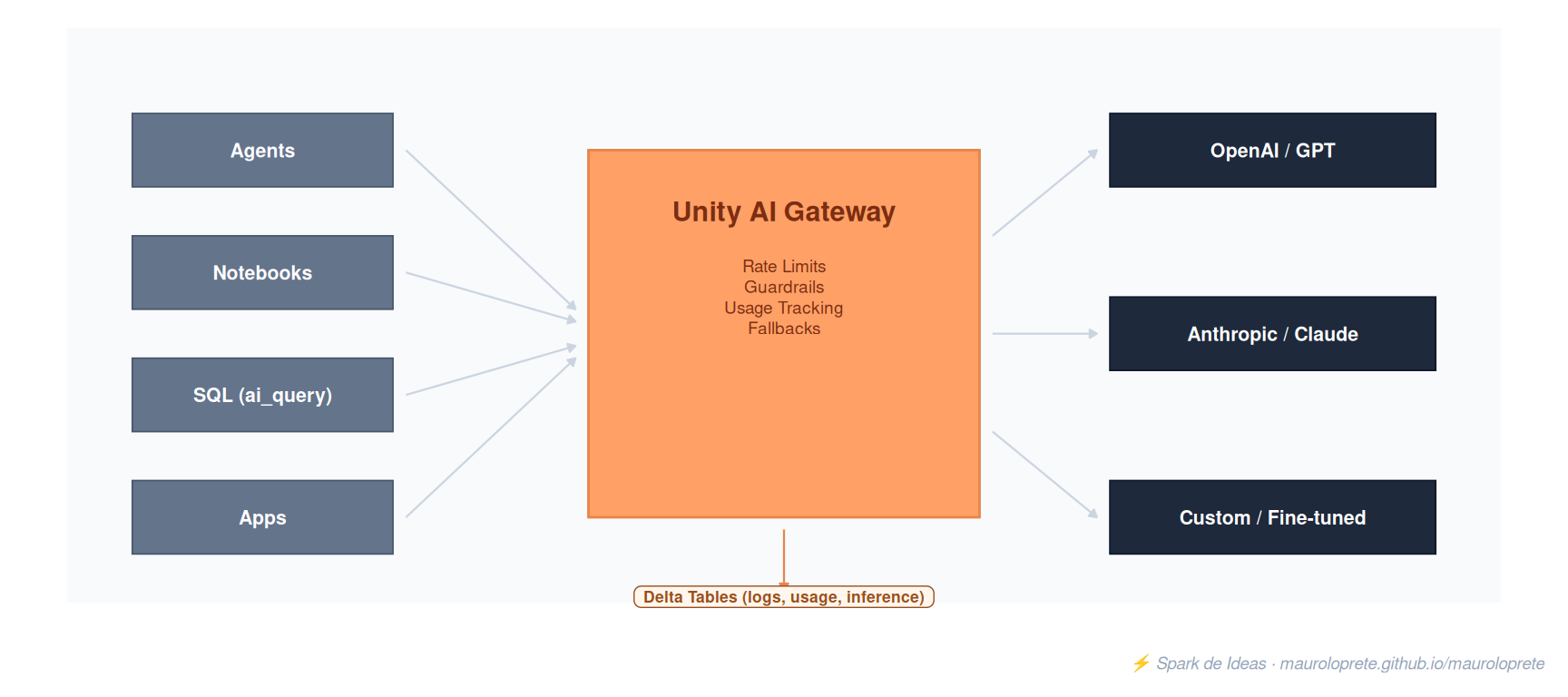
Unity AI Gateway: governance layer between consumers and the LLM models.
AI Gateway is a proxy layer between your consumers (agents, notebooks, apps, SQL) and the LLM models (OpenAI, Anthropic, Google, custom models). All the traffic goes through the gateway, which enforces governance rules and logs everything to Delta Tables inside Unity Catalog.
What it controls:
Who can use which model (Unity Catalog permissions)
How much each user/group can use (rate limits)
Which content goes through and which gets blocked (guardrails)
How much each team/project costs (cost attribution)
What happens if the primary model fails (fallbacks)
1. OpenAI-compatible API
The key to AI Gateway is that it exposes an OpenAI-compatible API. Any SDK that supports OpenAI works by just changing the base_url:
Listing 1: Using AI Gateway with the OpenAI SDK: only base_url and api_key change
from openai import OpenAIclient = OpenAI( api_key=DATABRICKS_TOKEN, base_url="https://<workspace>.azuredatabricks.net/ai-gateway/mlflow/v1")response = client.chat.completions.create( model="databricks-claude-sonnet-4", messages=[{"role": "user", "content": "What is Delta Lake?"}], max_tokens=256,)print(response.choices[0].message.content)
It also supports each provider’s native API:
Listing 2: Anthropic’s native API through AI Gateway
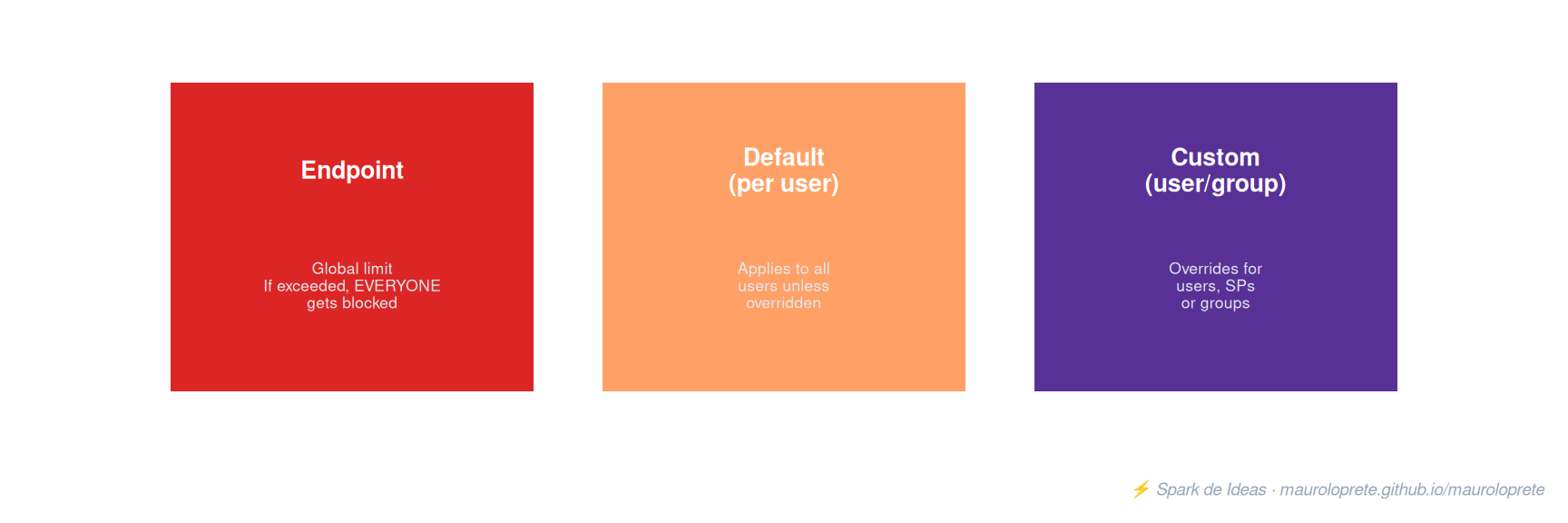
Global limit. If exceeded, all requests get blocked
Default (user)
Applies to every user, unless overridden
Custom
Override for individual users, service principals or groups
Key rules
If a user has both QPM and TPM configured, the most restrictive one applies
User limits override group limits
Maximum of 20 rate limits and 5 group-specific limits per endpoint
Requests exceeding the limit get HTTP 429 (Too Many Requests)
Rate limiting is free
TipTip: short bursts can slip through
The implementation may allow short bursts because concurrent requests are processed before the usage counter gets updated. Don’t design assuming millisecond-exact enforcement.
3. Guardrails: smart content filtering
Guardrails use an LLM as an evaluator to filter content on input and/or output. Two endpoints are involved: the inference one (your model) and the evaluator (the one enforcing the guardrail).
Listing 3: Custom guardrail prompt: block off-topic questions for a support bot
You are evaluating whether a user message is off-topic for a
customer support assistant for Databricks.

A message is on-topic if it is about:
- Databricks features, pricing, or documentation
- Account, billing, or support issues
- Data engineering or analytics questions

Flag off-topic messages.

Examples:
- "How do I configure Unity Catalog?" -> on-topic, do not flag
- "What's a good recipe for lasagna?" -> off-topic, flag
Behavior
Fail-closed: if the evaluator fails, the request gets blocked (it can’t be bypassed through transient failures)
Dry-run mode: evaluate without blocking — useful for testing
Blocked requests return HTTP 400
Maximum of 3 blocking + 1 sanitizing guardrails per phase (input/output)
Timeout: 30 seconds per guardrail
WarningGuardrail limitations
They don’t see the system prompt, previous conversation turns, tool-call payloads or images
Single-message evaluation — they don’t detect multi-turn patterns
Not supported with custom model endpoints
Each guardrail call is billed as a regular call to the evaluator endpoint
4. Usage Tracking
Every request that goes through AI Gateway gets logged in the system.ai_gateway.usage system table.
Key fields
Field
Type
Description
endpoint_name
STRING
Endpoint name
requester
STRING
User or service principal
destination_model
STRING
Model that processed the request
input_tokens
LONG
Input tokens
output_tokens
LONG
Output tokens
total_tokens
LONG
Total tokens
latency_ms
LONG
Total latency
status_code
INT
HTTP status
endpoint_tags
MAP
Endpoint tags (team, project)
request_tags
MAP
Individual request tags
routing_information
STRUCT
Fallback attempt details
Request tags for cost attribution
You can tag each individual request for granular tracking:
Listing 4: Request tags for cost attribution per project and team
Listing 5: Usage tracking: tokens consumed per user over the last 30 days
SELECT requester, destination_model,COUNT(*) AS requests,SUM(total_tokens) AS total_tokensFROMsystem.ai_gateway.usageWHERE event_time >=current_date() -INTERVAL30 DAYSGROUPBY requester, destination_modelORDERBY total_tokens DESC
Listing 6: Consumption per project using request tags
SELECT request_tags['project'] AS project,COUNT(*) AS requests,SUM(total_tokens) AS total_tokensFROMsystem.ai_gateway.usageWHERE request_tags['project'] ISNOTNULLGROUPBY request_tags['project']ORDERBY total_tokens DESC
5. Cost Attribution
AI Gateway enriches system.billing.usage with dedicated fields to track how much each team spends:
Cost queries
Listing 7: Cost in DBUs per endpoint over the last 30 days
SELECT usage_metadata.ai_gateway_endpoint_name AS endpoint,SUM(usage_quantity) AS dbusFROMsystem.billing.usageWHERE billing_origin_product ='MODEL_SERVING'AND usage_metadata.ai_gateway_endpoint_name ISNOTNULLAND usage_unit ='DBU'AND usage_date >=current_date() -INTERVAL30 DAYSGROUPBY endpointORDERBY dbus DESC
Listing 8: Cost in DBUs per destination model
SELECT usage_metadata.ai_gateway_destination_model AS model,SUM(usage_quantity) AS dbusFROMsystem.billing.usageWHERE billing_origin_product ='MODEL_SERVING'AND usage_metadata.ai_gateway_endpoint_name ISNOTNULLAND usage_unit ='DBU'AND usage_date >=current_date() -INTERVAL30 DAYSGROUPBY modelORDERBY dbus DESC
Listing 9: Cost in DBUs per team using endpoint tags
SELECT custom_tags['team'] AS team,SUM(usage_quantity) AS dbusFROMsystem.billing.usageWHERE billing_origin_product ='MODEL_SERVING'AND custom_tags['team'] ISNOTNULLAND usage_unit ='DBU'AND usage_date >=current_date() -INTERVAL30 DAYSGROUPBY teamORDERBY dbus DESC
ImportantExternal model costs
Requests to external models (direct OpenAI, Anthropic with your API key) are billed by the provider and don’t show up in system.billing.usage. Only Databricks DBU costs appear there. For complete tracking of external models, use inference tables.
6. Fallbacks and Traffic Splitting
Fallbacks
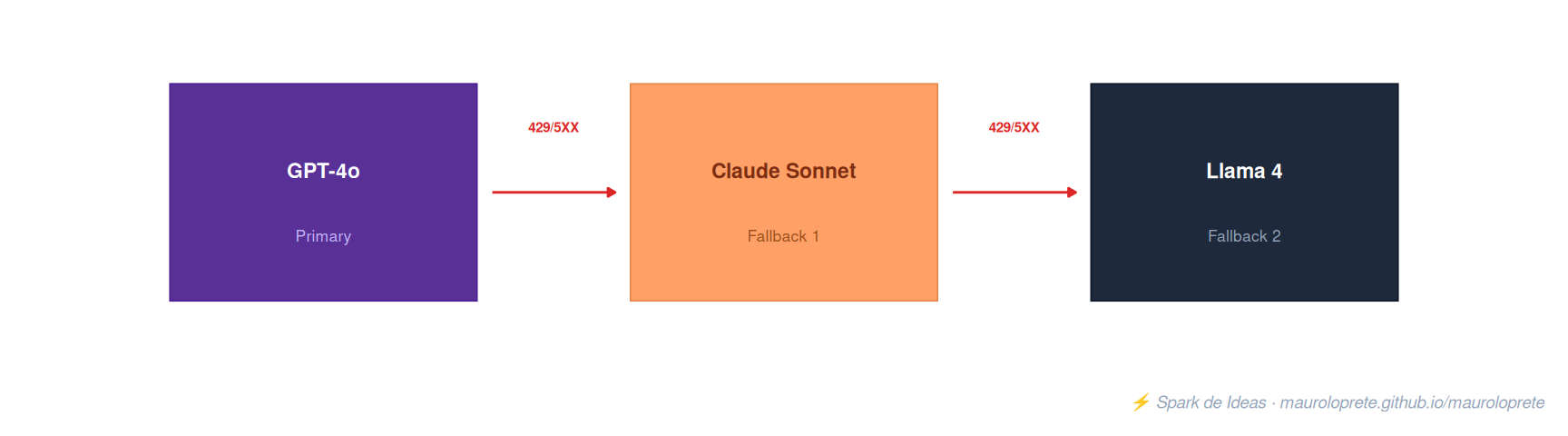
If the primary model fails (429 or 5XX), AI Gateway automatically routes to the next model in the chain:
Fallback chain: if the primary model fails with 429/5XX, the next one is tried.
Triggered by 429 errors (rate limit) or 5XX (server error)
Each fallback is tried once, in sequential order
If they all fail, the request fails and the last error gets logged
Attempts are recorded in routing_information in the usage table
Traffic Splitting
Distributes requests across multiple models by percentage:
Model
Percentage
Use
GPT-4o
80%
Main model
Claude Sonnet
20%
A/B testing
Percentages must add up to 100
Maximum of 5 destinations per traffic split
Use cases: A/B testing, gradual rollout, load balancing across providers
Traffic splitting and fallbacks are independent: the split determines the primary model, fallbacks apply if that model fails.
7. Inference Tables (Payload Logging)
Inference tables store the full request and response of every call. Useful for auditing, debugging and fine-tuning.
Key fields
Field
Type
Description
request
STRING
Raw JSON of the request
response
STRING
Raw JSON of the response
latency_ms
LONG
Total latency
status_code
INT
HTTP status
requester
STRING
Who made the request
sampling_fraction
DOUBLE
Sampling fraction (1 = everything)
Limitations
Only in external storage catalogs (no default storage)
Maximum payload: 10 MiB
Best effort delivery: logs are usually available within minutes, not guaranteed
May not log requests with 401, 403, 429, 500 errors
8. External Models: bring your own API key
To use models from external providers with your own API key, you create an “external model” endpoint:
Listing 10: Create an external model endpoint with an Anthropic API key
Listing 14: ai_summarize: summarize text at scale with batch inference
SELECT contrato_id, ai_summarize(texto_contrato) AS resumenFROM legal.contratos
TipAutomatic batching
AI Functions handle parallelization, retries and scaling internally. Send the entire dataset in a single query — Databricks optimizes the execution.
10. Permissions and authentication
Endpoint permissions
Permission
Can do
CAN MANAGE
Create, modify the endpoint and configure AI Gateway
CAN QUERY
Query the endpoint (this is what end users need)
Client authentication
Databricks Personal Access Token (PAT) as the api_key
The token is passed as Authorization: Bearer <token>
External model credentials
Stored via Databricks Secrets (referenced as {secrets/scope/key})
Automatically deleted when the endpoint is removed
11. Gotchas
1. Guardrails don’t see the system prompt. If you set up a jailbreak guardrail, it can’t evaluate the full conversation context — it only sees the user message. Attacks that exploit the system prompt go undetected.
2. One request can generate multiple billing events. Gateway routing + guardrail call + log ingestion = 3 DBU events for a single user request. Keep this in mind when estimating costs.
3. Config updates take 20-40 seconds. Rate limit updates up to 60 seconds. Don’t expect instant enforcement after a change.
4. External model costs don’t show up in system.billing.usage. Direct OpenAI/Anthropic costs are billed by the provider. Only Databricks DBUs appear in billing. For complete tracking, use inference tables + request tags.
5. ai_query with AI Gateway Beta has limitations. It only captures usage tracking. It does not enforce rate limits, guardrails, inference tables or fallbacks. For full governance, use the API directly.
6. Maximum of 3 blocking + 1 sanitizing guardrail per phase. If you need more, combine the logic into a custom guardrail with a more complex prompt.
7. Guardrails are single-message. They don’t detect patterns across a multi-turn conversation. A sophisticated attacker can spread a jailbreak over multiple messages.
8. If the evaluator endpoint loses access to the model, it fails closed. The guardrail blocks all traffic. Choose reliable evaluators and monitor their availability.
9. Inference tables only work in external storage catalogs. You can’t use the workspace’s default storage. Set up an external location first.
10. Not available in AWS GovCloud or Azure Government. Regional availability varies — not every model is in every region.
12. ucode: coding agents through AI Gateway
ucode is the Databricks CLI that connects coding agents with AI Gateway. Instead of configuring separate API keys for each tool, all the agents route through your workspace — with the same governance rules, rate limits and tracking.
Supported agents
Agent
Command
Claude Code
ucode claude
Codex (OpenAI)
ucode codex
Gemini CLI
ucode gemini
GitHub Copilot CLI
ucode copilot
OpenCode
ucode opencode
Pi
ucode pi
Installation
Listing 15: Install ucode with uv (requires Python 3.12+)
Listing 16: Configure ucode: workspace, agents and MCP servers
# Interactive setup (asks for workspace and authenticates)ucode configure# Configure specific agentsucode configure --agents claude,codex# Multi-workspaceucode configure --workspaces https://first.databricks.com,https://second.databricks.com# Add Databricks MCP servers (SQL, Vector Search, UC Functions)ucode configure mcp# Preview without applying changesucode configure --dry-run
Usage
Listing 17: Use coding agents through AI Gateway with ucode
# Launch Claude Codeucode claude# Resume previous sessionucode claude -r# Check status and configured modelsucode status# Check usage statisticsucode usage# Restore original configsucode revert
How it works
ucode configure asks for your workspace URL and authenticates with your Databricks credentials
It modifies each agent’s configuration files (~/.claude/settings.json, ~/.codex/config.toml, etc.) to route through AI Gateway
It backs up the existing configs before modifying them
All the coding agents’ traffic goes through AI Gateway — with rate limits, usage tracking, cost attribution and guardrails
TipNo separate API keys
With ucode, you don’t need OpenAI, Anthropic or Google API keys for your coding agents. Everything authenticates with your Databricks credentials and is governed from AI Gateway.