If I were starting from scratch… what I’d prioritize learning in Data Engineering
Podcast
Data Engineering
Career
Python, SQL, Spark, dbt, Databricks — the order matters. What I learned after years of working with data and what I’d do differently if I had to start over.
TipEpisode material
I’m Mauro Loprete, Data Engineer at F1RST (Santander Group). I hold both Databricks certifications — Data Engineer Professional and Associate — and I’m working toward the MVP. I teach Data Science and Machine Learning at UdelaR, and this podcast is my way of sharing what I’ve learned along the way.
In this post I share what I’d prioritize today if I had to start over in Data Engineering. The order matters — a lot.
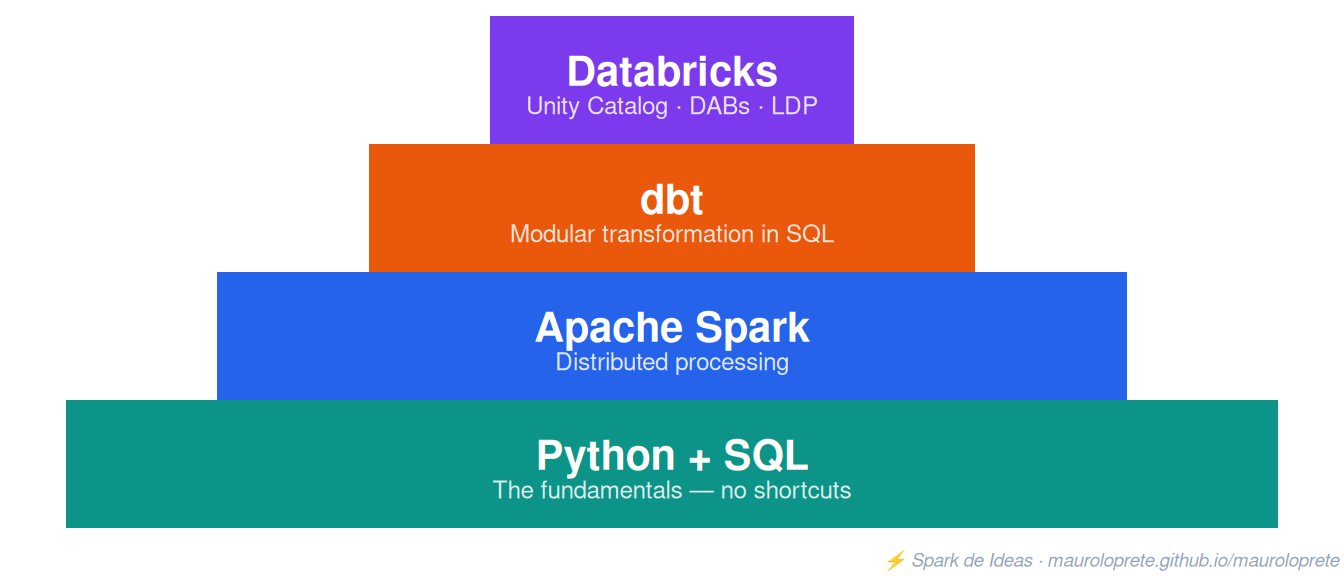
The pyramid: from the bottom up
You can’t learn Spark without knowing Python. You can’t understand dbt without mastering SQL. And Databricks without Spark is like driving a race car without knowing how to brake.
1. Python: the foundation of everything
I’m not talking about writing a print("Hello world"). I’m talking about:
- Data structures: lists, dictionaries, sets, tuples. 80% of what you do in data is manipulating structures.
- Functions and decorators: when you work with Spark or dbt, you’ll need to understand how functions compose.
- File handling: JSON, CSV, YAML, Parquet. In data engineering you live reading and writing files.
- Virtual environments and dependencies:
venv,pip,pyproject.toml. If you don’t know how to manage dependencies, your first production project will be a disaster. - Basic testing:
pytest. You don’t need to be a TDD expert, but you do need to know how to test a function.
# The bare minimum you need to master in Python
from dataclasses import dataclass
from typing import List, Optional
import json

@dataclass
class DataProduct:
    name: str
    owner: str
    tables: List[str]
    sla_hours: Optional[int] = None

    def is_critical(self) -> bool:
        return self.sla_hours is not None and self.sla_hours <= 4

# Read config, parse, validate — this is 60% of the real job
with open("products.json") as f:
    products = [DataProduct(**p) for p in json.load(f)]

critical = [p for p in products if p.is_critical()]
Mistake I made: I started with pandas without mastering pure Python. Later it took me twice as long to understand why things didn’t work. Python first, then the libraries.
Classes: why they matter and when to use each kind
In data engineering you end up modeling things all the time: pipeline configurations, connections, validation results, data contracts. If you do everything with dictionaries, you spend your life writing config["database"]["host"] and praying the key exists.
Classes solve that: they give you structure, autocomplete in the IDE, and clear errors when something is missing.
The thing is, Python has several ways to define classes, and each one has its place:
Traditional class — full control, but lots of boilerplate:
class Pipeline:
    def __init__(self, name: str, source: str, target: str, schedule: str = "daily"):
        self.name = name
        self.source = source
        self.target = target
        self.schedule = schedule

    def __repr__(self):
        return f"Pipeline(name={self.name!r}, source={self.source!r})"

    def __eq__(self, other):
        return (self.name == other.name and self.source == other.source
                and self.target == other.target and self.schedule == other.schedule)

p = Pipeline("ingest_sales", "raw.sales", "silver.sales")
That’s 12 lines for something that should be simple. And if you forget __eq__, two pipelines with the same data won’t be equal. And if you forget __repr__, debugging is a pain.
@dataclass — the right choice 90% of the time:
from dataclasses import dataclass, field
from typing import Optional

@dataclass
class Pipeline:
    name: str
    source: str
    target: str
    schedule: str = "daily"
    tags: list[str] = field(default_factory=list)

    def full_target(self) -> str:
        return f"catalog.{self.target}"

p = Pipeline("ingest_sales", "raw.sales", "silver.sales")
print(p)  # Pipeline(name='ingest_sales', source='raw.sales', ...)
p == Pipeline("ingest_sales", "raw.sales", "silver.sales")  # True
5 lines and you get __init__, __repr__, __eq__ for free. You can add your own methods. Use field(default_factory=list) for mutable default values (never write tags: list = [] — it’s a classic Python bug).
@dataclass(frozen=True) — when the object shouldn’t change:
@dataclass(frozen=True)
class ConnectionConfig:
    host: str
    port: int
    database: str
    ssl: bool = True

# This works:
config = ConnectionConfig("db.prod.internal", 5432, "analytics")

# This fails (and that's what you want):
config.host = "other"  # FrozenInstanceError
Configurations, credentials, validation results — anything that shouldn’t mutate after being created. Plus, frozen dataclasses are hashable, so you can use them in sets and as dictionary keys.
What is immutability and why should you care?
An immutable object is one that can’t be modified after it’s created. And the obvious question is: why would I want that?
The problem with mutable objects is that anyone can change them at any time, and in a pipeline with many functions that turns into a disaster:
# MUTABLE object — the problem
@dataclass
class Config:
    host: str
    port: int
    timeout: int = 30

config = Config("db.prod.internal", 5432)

# Function A reads the config
def connect(config):
    return f"Connecting to {config.host}:{config.port}"

# Function B modifies it without you noticing
def add_debug_settings(config):
    config.host = "localhost"  # ← changed the production config
    config.timeout = 999

# In your pipeline:
connect(config)           # → "Connecting to db.prod.internal:5432" ✓
add_debug_settings(config)
connect(config)           # → "Connecting to localhost:5432" ← BUG
The same config variable now points to localhost instead of production. These bugs are hard to find because they don’t throw an error — the data is just wrong.
With immutability this doesn’t happen:
@dataclass(frozen=True)
class Config:
    host: str
    port: int
    timeout: int = 30

config = Config("db.prod.internal", 5432)

# This throws FrozenInstanceError immediately:
config.host = "localhost"  # ← ERROR, won't let you

# If you need a modified version, you create a new one:
from dataclasses import replace

debug_config = replace(config, host="localhost", timeout=999)

# config stays intact:
print(config.host)        # → "db.prod.internal"
print(debug_config.host)  # → "localhost"
Each version is a separate object. The original is never touched. This is called creating instead of mutating, and it’s the safest way to work with data that passes through multiple functions.
In data engineering this comes up all the time:
# Pipeline configuration — shouldn't change during execution
@dataclass(frozen=True)
class PipelineConfig:
    source_table: str
    target_table: str
    batch_size: int = 10000
    mode: str = "append"

# Result of a validation — it's a fact, it doesn't change
@dataclass(frozen=True)
class QualityCheck:
    rule_name: str
    passed: bool
    value: float
    threshold: float

# Credentials — should NEVER be mutated in memory
@dataclass(frozen=True)
class Credentials:
    host: str
    token: str
    workspace_id: str
When to mutate and when not to?
- Immutable (
frozen=True): configurations, credentials, results, metadata — anything that travels between functions and shouldn’t change - Mutable (regular dataclass): objects that accumulate state during a process, like a logger or a builder you assemble step by step
The rule: when in doubt, make it immutable. It’s easier to relax the restriction later than to hunt down a bug caused by an unexpected mutation at 3 AM.
NamedTuple — when you want immutability + unpacking:
from typing import NamedTuple

class ValidationResult(NamedTuple):
    passed: bool
    errors: list[str]
    row_count: int

result = ValidationResult(False, ["nulls in amount"], 1500)

# Unpacks like a tuple:
passed, errors, count = result

# But you access by name:
if not result.passed:
    print(result.errors)
The key difference from a frozen dataclass: NamedTuples are real tuples. You can unpack them, iterate over them, and they use less memory. But you can’t add complex methods to them.
Pydantic BaseModel — when you need validation:
from pydantic import BaseModel, field_validator

class DataContract(BaseModel):
    name: str
    owner: str
    sla_hours: int
    columns: list[str]

    @field_validator("sla_hours")
    @classmethod
    def sla_must_be_positive(cls, v):
        if v <= 0:
            raise ValueError("SLA must be greater than 0")
        return v

# Validates automatically on creation:
contract = DataContract(
    name="transactions",
    owner="backend-team",
    sla_hours=4,
    columns=["id", "amount", "date"]
)

# This fails with a clear error:
bad = DataContract(name="x", owner="y", sla_hours=-1, columns=[])
# ValidationError: SLA must be greater than 0

# Parses from JSON/dict:
contract = DataContract.model_validate_json('{"name": "tx", ...}')
Pydantic is heavy (it’s an external dependency), but when you’re parsing YAML configurations, API responses or data contracts, automatic validation saves you hours of debugging.
When to use each one?
| Situation | Class type |
|---|---|
| Simple data model (most cases) | @dataclass |
| Configuration that must not change | @dataclass(frozen=True) |
| Lightweight, unpackable result | NamedTuple |
| Parsing JSON/YAML with validation | Pydantic BaseModel |
| Complex business logic, inheritance | Traditional class |
| Just grouping data, nothing else | dict (seriously, sometimes it’s enough) |
The general rule: start with @dataclass. If you need immutability, add frozen=True. If you need input validation, use Pydantic. If you need complex inheritance or full control of the lifecycle, a traditional class. And if it’s throwaway data you use once, a dict is fine.
Resources I recommend
- Python for Data Engineers — Real Python is excellent for going beyond the basics
- Automate the Boring Stuff — to lose the fear of scripting
- Python’s official documentation is surprisingly good. Read it.
2. SQL: the language that never dies
SQL is over 50 years old and it’s still the most widely used language in data. It doesn’t matter if you use Spark, dbt, Databricks or BigQuery — everything ends up in SQL.
What you really need to master:
- Window functions:
ROW_NUMBER(),LAG(),LEAD(),RANK(),SUM() OVER(). This is what separates a junior analyst from a senior one. - CTEs: Common Table Expressions. Write readable SQL, not 200-line nested queries.
- JOINs: not just
INNERandLEFT. UnderstandCROSS,ANTI,SEMI. Know when a JOIN multiplies your rows. - Aggregations with HAVING and GROUPING SETS: for real reporting.
- Correlated subqueries: to understand why they’re slow and when to avoid them.
from pyspark.sql import functions as F
from datetime import date, timedelta
import random

random.seed(42)

# Generate sales data
rows = []
customers = list(range(1, 10))
for day_offset in range(30):
    d = date(2026, 1, 1) + timedelta(days=day_offset)
    for cust in random.sample(customers, k=random.randint(2, 5)):
        rows.append((
            cust,
            float(random.randint(10, 500)),
            d,
            random.choice(["COMPLETED", "COMPLETED", "COMPLETED", "PENDING", "FAILED"])
        ))

sales_df = spark.createDataFrame(rows, ["customer_id", "amount", "sale_date", "status"])
sales_df.createOrReplaceTempView("sales")

print(f"Rows generated: {sales_df.count()}")
sales_df.show(5)%sql
-- Daily sales per customer with ranking and change vs previous day
WITH daily_sales AS (
SELECT
customer_id,
sale_date AS sale_day,
SUM(amount) AS daily_total,
COUNT(*) AS txn_count
FROM sales
WHERE status = 'COMPLETED'
GROUP BY 1, 2
),
ranked AS (
SELECT
*,
ROW_NUMBER() OVER (
PARTITION BY customer_id
ORDER BY daily_total DESC
) AS rn,
LAG(daily_total) OVER (
PARTITION BY customer_id
ORDER BY sale_day
) AS prev_day_total
FROM daily_sales
)
SELECT
customer_id,
sale_day,
daily_total,
prev_day_total,
ROUND(
(daily_total - prev_day_total) / prev_day_total * 100, 2
) AS pct_change
FROM ranked
WHERE rn <= 5
ORDER BY customer_id, rnMistake I made: I underestimated window functions. Once you master them, you solve in one query what used to take you 3 Python scripts.
3. Spark: thinking distributed
This is where things get interesting. Spark is not “big pandas” — it’s a different paradigm. If you don’t understand how it works under the hood, you’ll write code that takes 10x longer than it should.
The essentials
- Lazy evaluation: Spark doesn’t execute anything until you trigger an action (
collect(),count(),write()). Transformations accumulate into a plan. - Partitions: your data is distributed across partitions. If you don’t understand this, you’ll run
coalesce(1)on a 500GB dataset and kill the cluster. - Shuffle: the most expensive operation. Every
JOIN,GROUP BY,DISTINCTcan trigger a shuffle. Minimize them. - Broadcast joins: if a table is small (< 10MB), broadcast it. The difference can be minutes versus seconds.
- Catalyst optimizer: Spark optimizes your query plan. But if you write UDFs in Python, the optimizer can’t help you.
from pyspark.sql import functions as F
from pyspark.sql.window import Window

# Good: use native Spark functions
df = (
    spark.read.table("sales.transactions")
    .filter(F.col("status") == "completed")
    .withColumn(
        "running_total",
        F.sum("amount").over(
            Window.partitionBy("customer_id")
            .orderBy("transaction_date")
            .rowsBetween(Window.unboundedPreceding, Window.currentRow)
        )
    )
)

# Bad: Python UDF (breaks optimization, serializes row by row)
# @udf(returnType=DoubleType())
# def calc_running_total(amounts):
#     return sum(amounts)
The key concept nobody explains well
Spark has two APIs: DataFrame and Spark SQL. Internally they’re the same thing — both generate the same execution plan. Use whichever feels more comfortable, but understand that:
# This:
df.filter(F.col("amount") > 100).groupBy("customer_id").agg(F.sum("amount"))

# And this:
spark.sql("""
    SELECT customer_id, SUM(amount)
    FROM transactions
    WHERE amount > 100
    GROUP BY customer_id
""")

# Generate EXACTLY the same execution plan.
Mistake I made: I wrote Python UDFs for everything at first. When I understood the Catalyst optimizer and switched to native functions, jobs went from 45 minutes to 3 minutes. Without changing the cluster.
Wrapper functions vs UDFs — the most common confusion
This causes a lot of confusion. If you have a Python function that takes a DataFrame and calls .withColumn() inside, is that a UDF?
No. They’re completely different things.
A wrapper function uses Spark’s native API. Spark sees the operations, understands them and optimizes them:
# This is NOT a UDF — it uses the Spark API inside
def add_revenue_flag(df, threshold=1000):
    return df.withColumn(
        "high_revenue",
        F.when(F.col("amount") > threshold, True).otherwise(False)
    )

# Spark sees F.when and F.col → they're native expressions
# The Catalyst optimizer can combine, reorder and optimize them
result = add_revenue_flag(sales_df)
Here Spark knows exactly what you’re doing. Your function is just a way to organize the code — under the hood it’s still all native Spark.
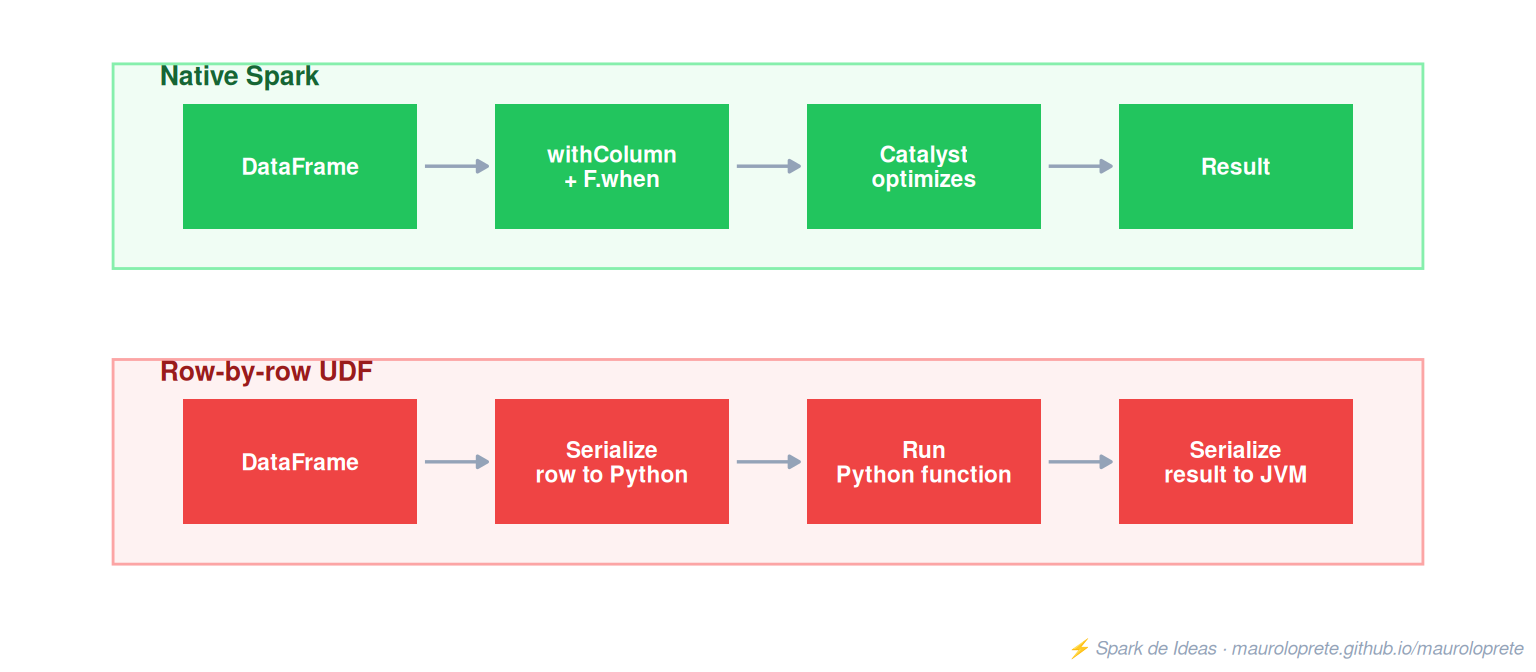
A UDF is when you ask Spark to run pure Python code row by row, pulling the data out of the optimized engine and passing it through the Python interpreter:
# This IS a UDF — pure Python, row by row
@udf(returnType=BooleanType())
def high_revenue_udf(amount):
    return amount > 1000

result = df.withColumn("high_revenue", high_revenue_udf(F.col("amount")))
What happens internally with the UDF?
- Spark serializes each row of data (JVM → Python)
- The Python interpreter runs your function
- The result gets serialized back (Python → JVM)
- Repeat that for every row of the DataFrame
That round-trip serialization is called serde overhead, and on a dataset with millions of rows it’s the difference between 3 minutes and 45 minutes.
When do you actually need a UDF? Almost never. But there are legitimate cases:
- Logic that has no equivalent among Spark’s functions (very complex custom regex, domain-specific mathematical calculations)
- Calling a Python library that doesn’t exist in Spark (a custom ML model, a geocoding library)
And if you have no other choice, use Pandas UDFs instead of regular UDFs — they process by batch instead of row by row, and they’re much faster:
from pyspark.sql.functions import pandas_udf
import pandas as pd

@pandas_udf("boolean")
def high_revenue_pandas(amount: pd.Series) -> pd.Series:
    return amount > 1000

# Processes by batch (vectorized), not row by row
result = df.withColumn("high_revenue", high_revenue_pandas(F.col("amount")))
4. dbt: SQL with software engineering
dbt (data build tool) changed how data transformations are done. The idea is simple: write your transformations in SQL, but with the software engineering practices that were always missing in data.
Why it matters
- Modularity: each model is a
SELECT. They reference each other with{ ref('model_name') }. - Testing: schema tests (
not_null,unique,relationships) and custom tests. - Documentation: generated automatically from the YAML.
- Lineage: you know exactly which model depends on which.
- Version control: everything is code, everything goes to Git.
-- models/staging/stg_transactions.sql
WITH source AS (
    SELECT * FROM {{ source('raw', 'transactions') }}
),

cleaned AS (
    SELECT
        transaction_id,
        customer_id,
        CAST(amount AS DECIMAL(18,2)) AS amount,
        CAST(transaction_date AS DATE) AS transaction_date,
        UPPER(TRIM(status)) AS status
    FROM source
    WHERE transaction_id IS NOT NULL
)

SELECT * FROM cleaned# models/staging/stg_transactions.yml
version: 2
models:
- name: stg_transactions
description: "Clean transactions from the core banking system"
columns:
- name: transaction_id
tests:
- not_null
- unique
- name: amount
tests:
- not_null
- dbt_utils.accepted_range:
min_value: 0
max_value: 1000000
- name: status
tests:
- accepted_values:
values: ['COMPLETED', 'PENDING', 'FAILED', 'REVERSED']dbt on Databricks
dbt works natively with Databricks via dbt-databricks. Models materialize as Delta tables in Unity Catalog.
# profiles.yml
my_project:
  target: dev
  outputs:
    dev:
      type: databricks
      catalog: dev
      schema: analytics
      host: "{{ env_var('DBX_HOST') }}"
      http_path: "{{ env_var('DBX_HTTP_PATH') }}"
      token: "{{ env_var('DBX_TOKEN') }}"
Mistake I made: I tried to do in Python what dbt solves much better in SQL. If your transformation is pure SQL (and most are), use dbt. If you need complex logic with APIs, ML or weird files, then yes, PySpark.
When dbt and when PySpark
| Case | Tool |
|---|---|
| SQL transformations (cleaning, joins, aggregations) | dbt |
| Complex logic with external APIs | PySpark |
| Machine Learning pipelines | PySpark + MLflow |
| Processing unstructured files (JSON, XML, images) | PySpark |
| Dimensional models (Kimball) | dbt |
| Streaming / near-real-time | PySpark Structured Streaming |
5. Databricks: the platform that ties it all together
Databricks isn’t just “Spark in the cloud”. It’s a complete data platform: compute, storage, governance, ML, SQL Analytics, and orchestration.
What I’d prioritize learning
Unity Catalog: the 3-level governance model (
catalog.schema.table). Permissions, lineage, and auditing. Without this, your lakehouse is a swamp.Lakeflow Declarative Pipelines (formerly DLT): declarative pipelines with expectations for quality. It’s the simplest way to build a Bronze → Silver → Gold pipeline.
Databricks Asset Bundles: infrastructure as code. Jobs, pipelines, permissions — everything in YAML, everything in Git, everything deployable with CI/CD.
Workflows: native orchestration. Triggers, task dependencies, retry policies. You don’t need Airflow for 90% of the cases.
SQL Warehouses: for analysts and dashboards. Serverless, scalable, and with smart caching.
-- What you need to know how to do in Databricks from day 1
-- Create a catalog and schema
CREATE CATALOG IF NOT EXISTS analytics;
CREATE SCHEMA IF NOT EXISTS analytics.sales;

-- Create a table with Liquid Clustering
CREATE TABLE analytics.sales.transactions (
    transaction_id BIGINT,
    customer_id BIGINT,
    amount DECIMAL(18,2),
    transaction_date DATE
)
USING DELTA
CLUSTER BY (transaction_date, customer_id);

-- Grants (basic governance)
GRANT USE CATALOG ON CATALOG analytics TO `analysts`;
GRANT USE SCHEMA ON SCHEMA analytics.sales TO `analysts`;
GRANT SELECT ON TABLE analytics.sales.transactions TO `analysts`;
Mistake I made: I started out using Databricks as “Jupyter in the cloud” — loose notebooks, no version control, no tests. When I discovered DABs and Unity Catalog, I realized I was using 10% of the platform.
Notebooks are NOT for production
This deserves its own section because it’s the most common mistake I see — and the hardest one to fix later.
Notebooks are an exploratory tool. They’re good for:
- Exploring a new dataset
- Trying out a transformation before productionizing it
- Doing ad-hoc analysis
- Prototyping a quick idea
Notebooks are NOT good for:
- Production pipelines that run every day
- Code that needs testing
- Logic that others will maintain
- Anything that needs code review in a PR
The real problem
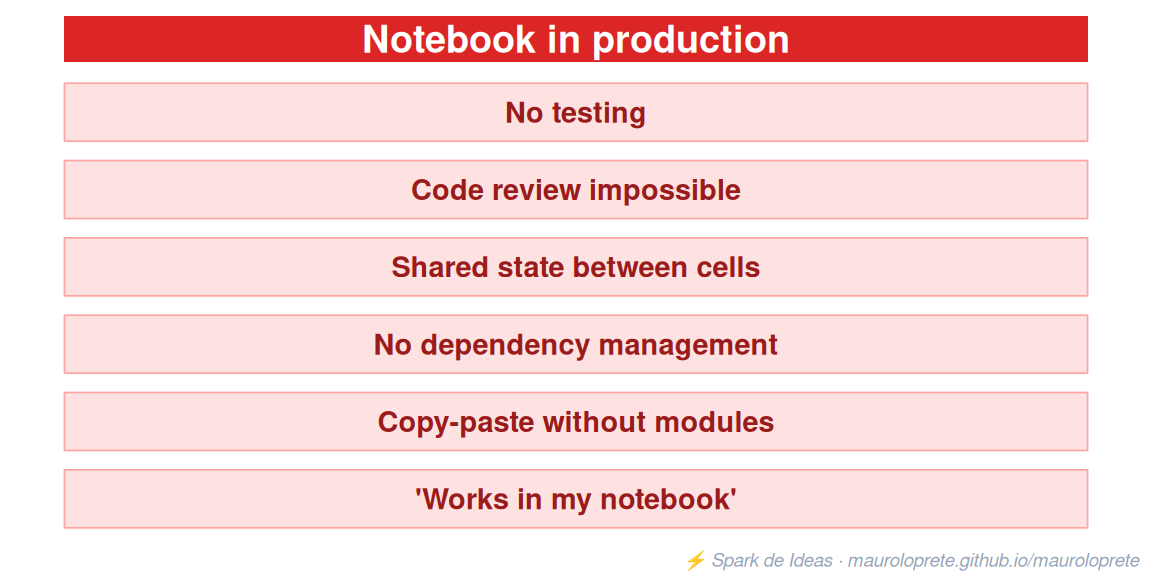
How to do it right
Use the notebook to explore and prototype. Once the logic works, move it into a Python module or a dbt model:

# src/transformations/clean_sales.py  ← THIS goes to production
def clean_transactions(df):
    """Cleans and validates transactions from the core system."""
    return (
        df
        .filter(F.col("transaction_id").isNotNull())
        .withColumn("amount", F.col("amount").cast("decimal(18,2)"))
        .withColumn("status", F.upper(F.trim(F.col("status"))))
        .filter(F.col("amount") > 0)
    )

# tests/test_clean_sales.py  ← THIS guarantees it doesn't break
def test_clean_removes_nulls(spark):
    input_df = spark.createDataFrame([
        (1, 100.0, "completed"),
        (None, 200.0, "pending"),
    ], ["transaction_id", "amount", "status"])

    result = clean_transactions(input_df)
assert result.count() == 1# databricks.yml ← THIS deploys it
resources:
jobs:
clean_sales:
name: "[${var.env}] Clean Sales"
tasks:
- task_key: run
python_wheel_task:
package_name: my_project
entry_point: clean_salesThe rule is simple: if something runs more than once, it shouldn’t live in a notebook. The notebook is the draft, not the final document.
Mistake I made: I had 800-line notebooks running in production for months. When something failed at 3 AM, debugging it was a nightmare. The day I migrated everything to Python modules + DABs + tests, I stopped getting alerts on weekends.
The roadmap: in what order
If I had to start from scratch today, I’d do this:
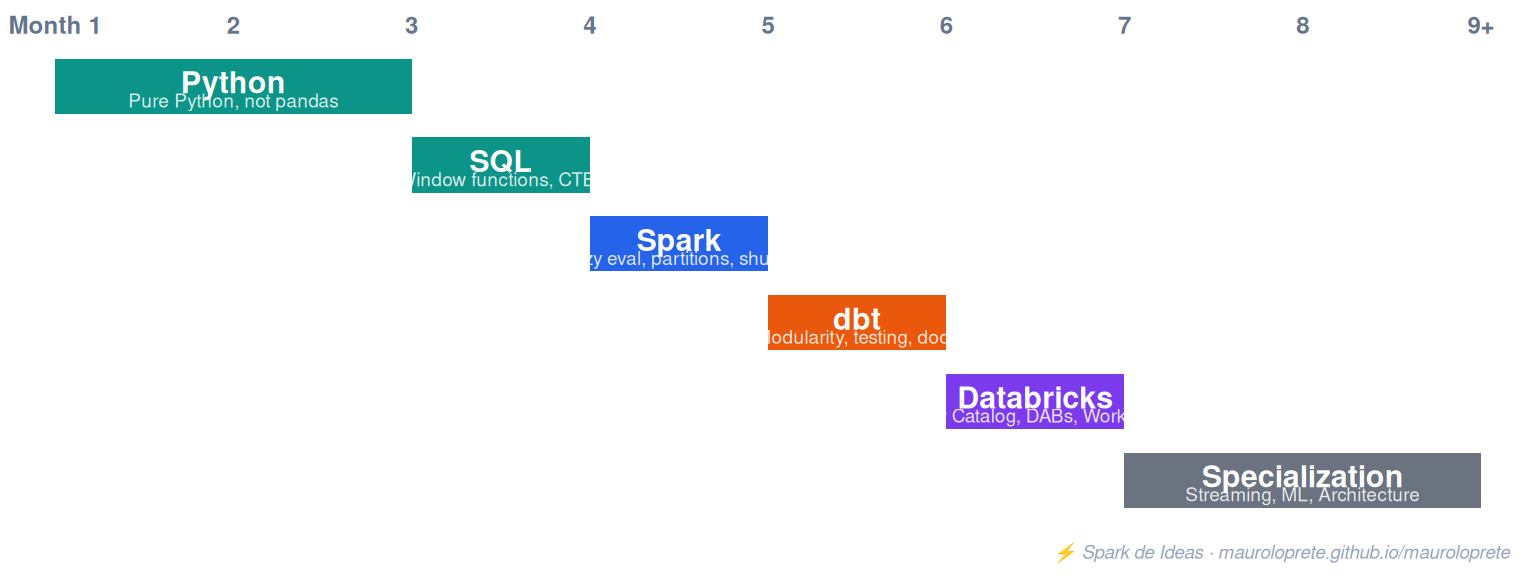
And most importantly: build something. Don’t just take courses. Grab a public dataset, build an end-to-end pipeline, deploy it, break it, fix it. That’s worth more than 10 courses.
What I would NOT prioritize
- Airflow: Databricks Workflows covers 90% of the cases. Airflow is an amazing tool but it has a steep learning curve and a big operational overhead. Learn it later, if you need it.
- Kafka: unless your company does real streaming (not micro-batch), you don’t need it at the start. Auto Loader + Structured Streaming solves most cases.
- Kubernetes: as a DE, you don’t need to be a K8s expert. Know the basics, but don’t go down that rabbit hole.
- All the clouds at once: pick one (AWS, Azure, GCP) and master it. The concepts transfer, but trying to learn all 3 at once is counterproductive.
Links
- Episode notebooks — Python, SQL and Spark to run on Databricks Free Edition
- Fundamentals of Data Engineering (Reis & Housley) — the best book to get started
- dbt Learn — free official dbt course
- Databricks Academy — official courses, some free
Next week on Databricks Tips: Delta Lake — 7 things I wish someone had told me sooner.