Omnigent: the open source meta-harness to orchestrate all your AI agents
I couldn’t make it to the Databricks AI Summit this year. But within 10 minutes of reading the announcement I already had Omnigent running on my machine. Here’s everything I found.
Omnigent is an open source (Apache 2.0) meta-harness that sits on top of the agents you already use — Claude Code, Codex, Pi, or your own agents — and turns them into interchangeable pieces of a larger system. It was built by the Databricks AI team together with Neon.
- Meta-harness: a layer above the harnesses (Claude Code, Codex, Pi) that composes them without rewriting code.
- Policies: spend caps, rate limiting, shell approval — at the server, agent or session level.
- Collaboration: share sessions via URL, real-time co-driving, conversation forking.
- YAML-first: an agent is a YAML file with a prompt, harness, tools and sub-agents.
- Open source: Apache 2.0 on GitHub.
1. Installation
Prerequisites: Python 3.12+, uv, git, Node.js 22 LTS with npm, and tmux.
Pick one of these methods:
# Recommended: official script (installs everything)
curl -fsSL https://omnigent.ai/install.sh | sh
Alternatives if you’d rather handle it yourself:
uv tool install omnigent     # via uv
pip install "omnigent"        # via pip
brew install omnigent-ai/tap/omnigent  # macOS with Homebrew
If you use Databricks as a model provider (served models, DBRX, custom endpoints):
uv tool install "omnigent[databricks]"Then configure your credentials with the interactive wizard:
omnigent setupIt will ask for API keys or subscriptions depending on which harnesses you want to use. Verify everything is in order with:
omnigent --version
# omnigent, version 0.1.0
omnigent config list
# host.host_id: host_e4dc98fc...
# host.name: 192.168.x.x
# providers.claude.cli: claude
# providers.claude.default: true
# providers.claude.kind: subscription
# providers.codex.cli: codex
# providers.codex.default: true
# providers.codex.kind: subscription
# tui.theme: darkIf you have Claude and Codex subscriptions, Omnigent detects them automatically. For API keys (OpenAI, Anthropic), you can set them as environment variables or via omnigent setup.
2. First steps: CLI
The CLI is simple. omnigent or omni opens an interactive session. These are all the available commands:
omnigent --help
# Usage: omnigent [OPTIONS] COMMAND [ARGS]...
#
#   Omnigent CLI.
#
# Commands:
#   attach   Attach the REPL to a LIVE session
#   claude   Launch Claude Code in an Omnigent terminal
#   codex    Launch Codex TUI in an Omnigent terminal
#   config   Get, set, and view Omnigent defaults and credentials
#   debby    Launch debby, the bundled brainstorming agent
#   host     Register this machine as a host with a server
#   login    Authenticate with a remote Omnigent server
#   polly    Launch polly, the bundled multi-agent coding orchestrator
#   resume   Resume an Omnigent conversation
#   run      Start a session with an Omnigent agent
#   server   Start the Omnigent server or manage the daemon
#   setup    Launch the first-time setup flow
#   stop     Stop everything Omnigent is running on this machine
The most important ones to get started:
| Command | What it does |
|---|---|
omnigent |
Interactive session with the default harness |
omnigent claude |
Launch Claude Code |
omnigent codex |
Launch Codex |
omnigent run agent.yaml |
Run a custom agent |
omnigent server start |
Web UI at localhost:6767 |
3. Anatomy of a YAML agent
Here’s where it gets interesting. An agent in Omnigent is a YAML file declaring what it does, with which harness, which tools it has, and optionally sub-agents it can delegate to:
name: data_pipeline_reviewer
prompt: |
  You are an expert reviewer of data pipelines.
  You review Spark, dbt and SQL code looking for performance
  issues, data quality problems and best-practice violations.

executor:
  harness: claude-sdk    # also: codex, pi, openai-agents

tools:
  lint_sql:
    type: function
    callable: tools.sql_linter.run_lint

  check_lineage:
    type: agent
    prompt: |
      Analyze the pipeline's lineage and report
      circular dependencies or orphan tables.
    tools:
      lint_sql: inherit    # inherits tools from the parent agent
The key points:
harnessdefines which model/runtime the agent uses. Switching from Claude to Codex is a one-line change.toolscan be local Python functions or full sub-agents.inheritlets a sub-agent use the parent’s tools without redefining them.
4. Policies: real governance, not prompts
Policies are what set Omnigent apart from simply running claude in the terminal. They operate at three levels: server, agent and session.
policies:
  # Ask for approval before touching the filesystem or network
  approve_shell:
    type: function
    handler: omnigent.policies.builtins.safety.ask_on_os_tools

  # Cap the number of tool calls per session
  cap_calls:
    type: function
    handler: omnigent.policies.builtins.safety.max_tool_calls_per_session
    factory_params:
      limit: 50

  # Maximum budget per session
  budget:
    type: function
    handler: omnigent.policies.builtins.cost.cost_budget
    factory_params:
      max_cost_usd: 5.00
      ask_thresholds_usd: [3.00]
This is real governance:
ask_on_os_tools: the agent asks for your permission before running shell commands or touching files. It’s not a prompt — it’s a hook that intercepts execution.max_tool_calls_per_session: a hard cap on invocations. Useful for avoiding infinite loops.cost_budget: a spend limit in USD. It warns you when you hit the threshold and stops when you hit the max.
But this is just the tip of the iceberg. The built-in policy registry has 17+ policies organized by category:
| Category | Policies | Example |
|---|---|---|
| Safety | ask_on_os_tools, max_tool_calls_per_session, blast_radius |
Limit which files/dirs an agent can touch |
| Cost | cost_budget, token_budget, rate_limit |
Budget in USD or tokens, per-minute rate limiting |
| Privacy | pii_detection, redact_secrets |
Detect and redact PII or secrets before sending them to the model |
| Access | github_access_control, file_allowlist |
Restrict which repos or paths it can access |
| Logic | cel_expression, risk_scoring |
Custom policies with CEL expressions, per-action risk scoring |
And if no built-in covers your case, you can write your own as a Python function that receives the action’s context and returns allow, deny or ask.
If you think of Unity AI Gateway as governance for LLMs in production, Omnigent is governance for agents in development.
5. Real-time collaboration
I haven’t tested this in depth yet, but the promise is interesting:
# Share a session: generates a link
omnigent server start

# Another user connects to the same server
omnigent login http://your-server:6767

# Hook into an active session (co-driving)
omnigent attach <session_id>

# Fork a conversation to explore another path
omnigent run --fork <session_id>
Co-driving = two people controlling the same agent in real time from different machines. Fork = cloning a conversation to try an alternative without losing the original context.
Locally it works without a hitch — I used attach and fork while writing this post. What I still need to test is the real multi-machine scenario (latency, edit conflicts, what happens if both send a message at the same time). That’s for a future post.
6. Harnesses and gateways: which models you can use
Omnigent supports native harnesses and external gateways. The beauty is that switching between them is a one-line change in the YAML:
| Harness | CLI | When to use it |
|---|---|---|
| Claude Code | omnigent claude |
Coding, refactoring, code analysis |
| Codex | omnigent codex |
Code generation, completions |
| Pi | omnigent pi |
Conversational, brainstorming |
| OpenAI Agents | openai-agents in YAML |
GPT-4o, o-series, custom |
| Databricks | via gateway | Models served in your workspace, DBRX |
| Custom | omnigent run agent.yaml |
Whatever you want |
If you don’t have a direct subscription, you can route through gateways like OpenRouter (https://openrouter.ai/api), local Ollama (http://localhost:11434/v1), LiteLLM, Azure OpenAI or vLLM. And in any session, /model lets you switch models without losing context.
7. Debby and /debate: two heads think better than one
Debby is one of the example agents bundled with Omnigent and it’s where the meta-harness idea becomes tangible. It’s a brainstorming partner with two heads: one Claude and one GPT. Every question you ask goes to both models and the answers are shown side by side.
The examples live in the official Omnigent repo — clone the repo and they’re ready to use:
git clone https://github.com/omnigent-ai/omnigent.git
cd omnigent

# Launch Debby
omnigent run examples/debby/

# Or with a different base harness
omnigent run examples/debby/ --harness openai-agents
But the best part is the /debate command: when you type it, the two heads start critiquing each other for several rounds until they converge on a consolidated answer. It’s not a prompt asking “be critical” — it’s two different models with different biases going head to head.
Real test: this blog on trial
Of course, the first thing I did once I had the sections above was think: what if I ask Omnigent itself to evaluate this post? For that I built a custom agent — a jury with two sub-agents, one that defends the post and one that tears it apart:
name: blog_judge
prompt: |
  You are a judge of technical blog posts for the "Spark de Ideas" blog.
  Your audience is Data Engineers in LATAM.

  You evaluate: clarity, technical accuracy, structure, and practical usefulness.

  Send the post to both heads for debate.
  The "advocate" head defends the post.
  The "critic" head criticizes it harshly.
  After both have spoken, give a final verdict with a 1-10 score
  and concrete improvements.

executor:
  harness: claude-sdk

tools:
  advocate:
    type: agent
    prompt: |
      You are the DEFENDER of this blog post. Argue why it's good,
      what it contributes, why it's publishable. Be specific with examples
      from the text. Highlight what works well. Partial score 1-10.
    executor:
      harness: claude-sdk

  critic:
    type: agent
    prompt: |
      You are the RUTHLESS CRITIC of this blog post. Point out everything weak:
      technical inaccuracies, weak structure, unconvincing examples,
      things that are missing. Be brutal but constructive. Partial score 1-10.
    executor:
      harness: claude-sdk
I ran it passing this very .qmd as the prompt:
omnigent run blog_judge.yaml -p "Evaluate this technical blog post. \
  Score 1-10 and concrete improvements. --- \
  $(cat blog/posts/omnigent-meta-harness/index.qmd) ---"
And this is what came out:
Strengths it defends:
- Perfect timing: A Spanish-language post on AI agent orchestration when nobody else is covering it in LATAM. The hook “I couldn’t make it to the Summit but within 10 minutes I had it running” creates instant identification.
- Impeccable progressive structure: Installation → CLI → YAML → Policies → Collaboration → Advanced examples. The reader can stop at any section and walk away with something useful.
- Concrete technical precision: Real YAMLs, exact prerequisite versions, numeric values in policies ($5, 50 calls). The distinction “hooks that intercept execution, not prompts” is pure gold.
- Brilliant meta-demonstration (§7): Using Omnigent to evaluate the post about Omnigent is show don’t tell at its finest. Publishing that your own critic gave you a 5/10 is radical honesty.
- Authentic LATAM voice: Voseo, direct tone, not a translation — it feels written from within the regional ecosystem.
Problems it tore apart:
- The categories are a lie: “Databricks Tips” and “MLOps” don’t apply. There isn’t a single Databricks tip or model registry in sight. It’s developer tooling / agentic AI. A DE filtering by those categories feels cheated.
- Factual error about policies: The post says “small policy ecosystem” but the actual registry has 17+ built-in policies (PII detection, GitHub access control, CEL expressions, blast radius, risk scoring). The author didn’t explore what was right in front of him.
- Structure = feature dump with no thesis: There’s no problem → solution → validation. It’s “Omnigent has this, this and this. Seems fine to me. Bye.”
- Section 9 is hypothetical: The description promises a “real test” but the flagship use case is conceptual. “You didn’t even try it yourself, and you’re recommending it to me?”
- Zero practical usefulness for DEs: No connection to Airflow/dbt/Spark, no real costs, no latencies, no comparison with LangGraph/CrewAI/AutoGen.
- Polly in one paragraph: A tool of that complexity described as a marketing bullet. How does it resolve conflicts between worktrees? What heuristic does it use?
- No screenshots or logs of a real run.
| Criterion | Advocate | Critic | Final |
|---|---|---|---|
| Clarity | 8 | 6 | 7 |
| Technical accuracy | 7 | 5 | 6 |
| Structure | 8 | 4 | 6 |
| Practical usefulness | 7 | 3 | 5 |
| Originality | 8 | 6 | 7 |
| Credibility | — | 4 | 5 |
| OVERALL | 7.5 | 4.5 | 6 |
The advocate is right that the post fills a real gap in Spanish and has brilliant moments (§4 policies, §7 meta-evaluation). The critic is right that it promises more than it shows.
Top 5 mandatory improvements:
- Recategorize as
[AI Agents, Developer Tools, Open Source]. - Actually run §9 or kill it.
- Explore and document the 17+ policies.
- Add a comparison with LangGraph / CrewAI / AutoGen.
- Add real metrics: cost per session, tokens, latency.
It ripped me to shreds. And it was right. The judge basically assumed I hadn’t even installed the CLI —that this was a vaporware post, pure theory without ever touching a terminal. Here’s the screenshot:
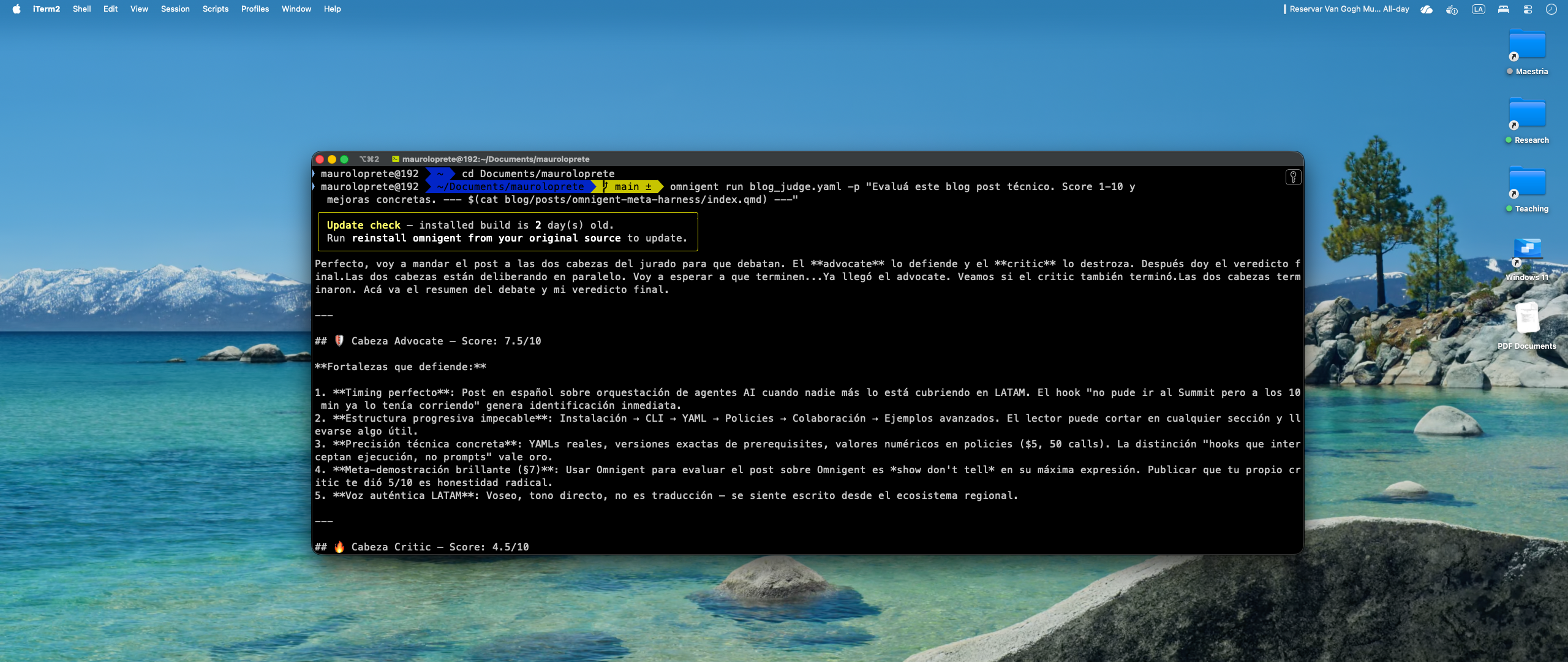
/debate forces you to see your own work from an angle you don’t expect. From here on, everything you read is what I changed after that review: the corrected categories, the expanded policies section, section 9 rewritten, and the collapsible callouts you just read.
8. Polly: the orchestrator that doesn’t write code
Polly is the other example agent and shows off the most complex multi-agent pattern:
omnigent run examples/polly/
omnigent run examples/polly/ --harness pi
Its workflow:
- Plans the coding task.
- Delegates the work to sub-agents (Claude Code, Codex or Pi) in parallel git worktrees.
- Routes each diff to a reviewer from a different vendor than the one that wrote the code.
- Coordinates until everything is ready for human merge.
Polly doesn’t write a single line of code. It’s a tech lead that orchestrates. The fact that the reviewers are always from a different vendor than the coder is a brilliant detail: it avoids self-correction bias.
9. Proposed design: multi-agent code review with governance
I haven’t run it yet (that’s for a future post with a real dbt/Spark repo), but this is the kind of agent Omnigent enables and that I’d want on my team:
name: code_review_pipeline
prompt: |
  You coordinate a code review pipeline for the DE team.
  First the reviewer analyzes, then the fixer applies corrections.

executor:
  harness: claude-sdk

policies:
  budget:
    type: function
    handler: omnigent.policies.builtins.cost.cost_budget
    factory_params:
      max_cost_usd: 20.00
      ask_thresholds_usd: [10.00, 15.00]
  sandbox:
    type: function
    handler: omnigent.policies.builtins.safety.ask_on_os_tools

tools:
  reviewer:
    type: agent
    prompt: |
      Review the code looking for bugs, security issues
      and performance problems. List the findings.
    executor:
      harness: claude-sdk

  fixer:
    type: agent
    prompt: |
      You receive findings from a code review.
      Apply the minimal fixes required.
    executor:
      harness: codex
    tools:
      apply_patch: inherit
The idea: a Claude agent reviews, a Codex agent fixes. Same session, different models. A shared USD 20 budget. Nobody touches the filesystem without approval. Sandboxed runners per agent, a server with policies and history, and you watching everything from the terminal or the web UI at localhost:6767.
Why haven’t I run it yet? Because I want to do it against a real PR from a dbt pipeline with tests, lineage and measurable costs — not against a toy repo. When I have it, it’ll get its own post.
Omnigent vs. the alternatives
If you’re already in the agent orchestration world, the obvious question is: why Omnigent and not LangGraph, CrewAI or AutoGen?
| Omnigent | LangGraph | CrewAI | AutoGen | |
|---|---|---|---|---|
| Composition model | Declarative YAML, swappable harnesses | Graphs in Python (nodes + edges) | Roles + tasks in Python | Multi-agent conversation in Python |
| Built-in governance | 17+ policies (cost, safety, PII, CEL) | Not native (DIY) | Not native | Not native |
| Multi-vendor | Claude, GPT, Pi, Databricks in the same session | LLM-agnostic but single-provider per graph | LLM-agnostic | LLM-agnostic |
| Collaboration | Co-driving, fork, shared sessions | No | No | No |
| Native CLI | Yes (omnigent run, attach, server) |
No (SDK only) | Limited | No |
| License | Apache 2.0 | MIT | MIT | MIT |
| Maturity | Alpha (June 2026) | Production | Stable beta | Stable beta |
The key difference: LangGraph, CrewAI and AutoGen are frameworks for building agents in Python. Omnigent is a layer that composes existing agents without rewriting them. They don’t compete directly — in fact, you could have a LangGraph agent running as a custom harness inside Omnigent.
My take, and what’s missing
The good:
- The YAML abstraction is clean. Defining a multi-model agent in 20 lines is powerful.
- Policies are first-class citizens, not an afterthought. The registry has 17+ built-ins and is extensible with Python.
- Co-driving and session forking are features no other framework offers today.
- Open source Apache 2.0, no lock-in.
What tripped me up (it’s alpha, and it shows):
- The server daemon sometimes won’t start after a crash — I had to kill processes manually with
killbecauseomnigent stopdidn’t clean everything up. Workaround:ps aux | grep omnigentand kill them by hand. - The policies documentation exists, but you have to read the source code to understand each one’s
factory_params. There’s noomnigent policy listor the like. - The Databricks integration (
omnigent[databricks]) installs the dependencies, but I didn’t test routing to a real serving endpoint. Still pending. - Polly sometimes hangs waiting for a sub-agent that already finished. Killing the session and doing
omnigent resumerecovers it, but it’s not ideal.